
If you’re involved in the streaming industry—or even just curious about how it all works—you’ve probably come across the term transcoding more than once. Maybe you already have a basic idea of what it means, or maybe you’re still wondering what exactly it is and why it keeps coming up. Either way, by the end of this blog post, you’ll have a solid understanding of the transcoding process and why it plays such a crucial role in live streaming. In particular, if you’re aiming to implement adaptive streaming to reach a broader audience with different devices and connection speeds, transcoding becomes essential. So, what is transcoding? Let’s break it down.
But before we dive into transcoding, we need to take a step back and talk about encoding. Understanding encoding is essential because transcoding builds directly on it. In fact, you can’t fully grasp what transcoding is—or why it matters—without first understanding how encoding works and why it’s the foundation of any successful stream.
What Is Encoding?

Encoding is the process of converting raw audio and video data from your input devices—such as a webcam, microphone, capture card, or streaming software—into a digital format that can be transmitted to streaming platforms. In a typical streaming setup, encoding serves as the bridge between your input sources and the final output, making it a fundamental step in getting your content online.
This process relies on a codec (short for coder-decoder), which is software that determines how your raw data is compressed and formatted. One of the most widely used codecs for live streaming is H.264, known for its ability to efficiently compress video without sacrificing too much quality. It supports a range of resolutions, even up to 8K, making it versatile for various streaming needs.
During encoding, several parameters are set that directly impact the final video’s quality and size. These include compression level, resolution, and bitrate. The encoded data is then packaged into a container (such as MP4 or MKV), which holds both the video and audio streams along with metadata like duration, codec information, and more. The result of this process is a fully-formed digital video file—ready to be streamed, stored, or further processed.
Some of the common video encoding standards
- H.264
- VP9
- AV1
- HEVC
- VP8
Let’s dive into the question of what is transcoding.
What Is Transcoding?
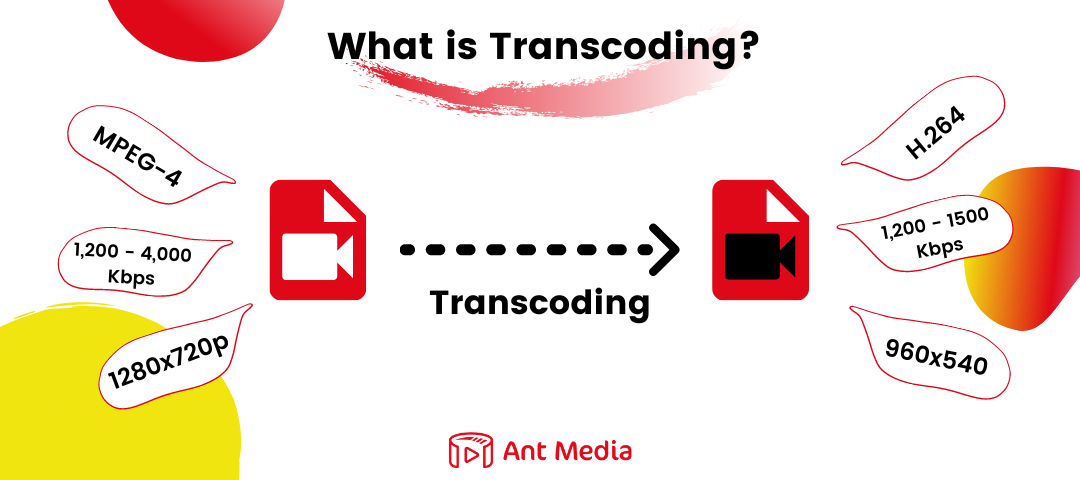
Now that we’ve covered encoding, we’re ready to answer the next big question: What is transcoding?
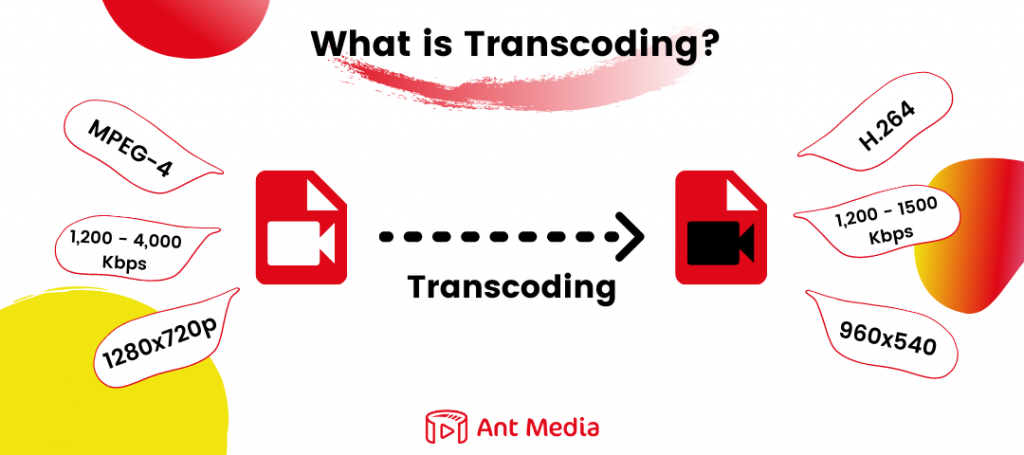
At its core, transcoding is the process of converting an audio or video file from one encoding format to another. This step is crucial for increasing compatibility across a wide range of devices, platforms, and network conditions. By transcoding, you’re ensuring that your content can be played smoothly whether it’s being viewed on a high-end desktop with a fast internet connection or a mobile device on a limited data plan.
The term transcoding actually includes two key sub-processes: transrating and transsizing.
- Transrating involves changing the bitrate of a video stream. For example, a high-quality 2K stream at 16 Mbps might be converted into lower bitrate versions—like 720p at 5 Mbps or 480p at 1.5 Mbps. These versions, often referred to as renditions, allow streaming platforms to deliver video suited to the viewer’s available bandwidth and device capability.
- Transsizing, on the other hand, refers to adjusting the resolution of the video. A stream originally captured at 2560×1440 (2K UHD) might be resized to more common resolutions like 1920×1080 (1080p), 1280×720 (720p), or even 720×480 (SD). This allows the content to be accessible to a wider audience while reducing the processing and bandwidth load.
Together, these processes make up the foundation of adaptive streaming—a method that dynamically delivers the best possible version of a stream based on the viewer’s real-time conditions.
What Is Transmuxing?
An important point! The what is transmuxing question is as critical as the question of what is transcoding. Transcoding is not the same as transmuxing. Transmuxing is also called recoding, repacking, packaging, or repacking. Transmuxing is a process that you take compressed audio and video and pack/repack it in different formats with keeping audio or video content original.
For example, you might have H.264 / AAC content and change the container in which it is packaged so you can use it HTTP Live Streaming (HLS), Smooth Streaming, HTTP Dynamic Streaming (HDS), or Dynamic Adaptive Streaming over HTTP (DASH). The computational overhead for transmuxing is much smaller than transcoding.
How Does Transcoding Work?
When a video is recorded—whether live or on-demand—it’s typically saved in a format specific to the capturing device or software. These raw formats are often not optimized for playback across different devices or platforms.
That’s where transcoding comes in.
Transcoding is a two-step process:
- Decoding – The original compressed video is first decoded into an uncompressed format.
- Re-encoding – That uncompressed video is then encoded into a new format, resolution, or bitrate that’s compatible with the viewer’s device or network conditions.
This process ensures smooth playback and broad compatibility, especially important for adaptive streaming and delivering content across varying devices and bandwidths.
Why Is Transcoding Important For Streaming?
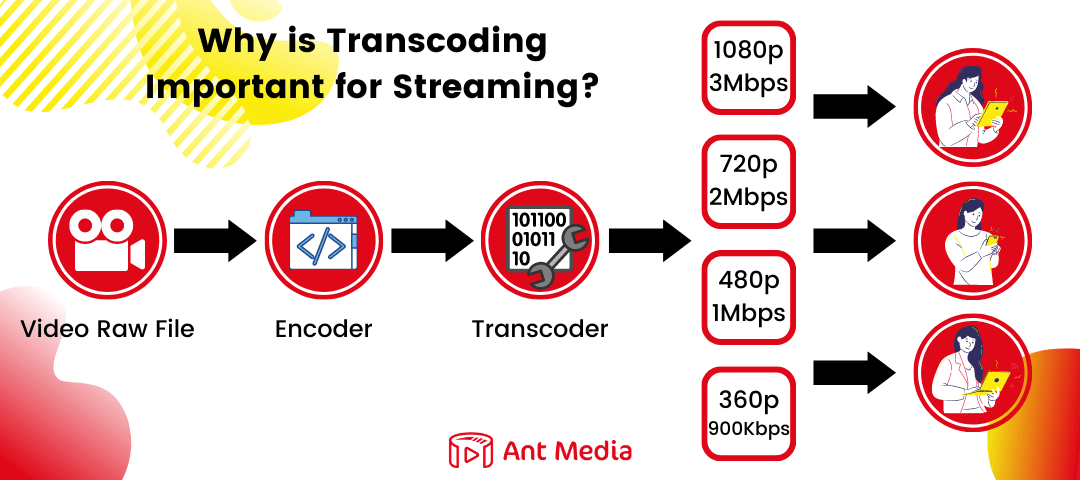
The most important benefit of Video Transcoding is that it enables live streams to be watched by a much wider audience regardless of connection or device.
For example, you want to live stream using a camera and encoder. Suppose you’re compressing your content with an RTMP encoder and selecting the H.264 video codec at 1080p.
You prepared the live broadcast content, you worked hard. Of course, you don’t want this effort to be wasted. But if you try to stream your perfect live stream directly, you’ll likely run into a few issues. Quick information: The world’s average fixed broadband download speed has increased by 38% in just two years and is currently around 64Mbsp. However, actual speeds vary greatly between different countries, even between different regions in the same country and different types of connections.
So First issue, viewers who do not have enough bandwidth cannot watch the stream. It will buffer the players continuously while waiting for the packets of the 1080p video to arrive. For example, It will not be possible for you to make an audience living in America and a viewer living in Nigeria happy with the same bitrate.
Second, the RTMP protocol has now lost Adobe’s support. Therefore, it will not be possible to reach large audiences with RTMP playback. Apple’s HLS is much more widely used. You exclude almost anyone with slow data speed, tablets, mobile phones, and smart TV devices without transcoding and transmuxing video.
With video transcoding software, you can stream video files that have different bitrates and frame sizes, while converting the codecs and protocols to reach a wider audience. These devices and status compatible streams can be packaged into several streaming formats (such as HLS, WebRTC, or CMAF). Transcoding allows us to play videos on almost any screen.

Another important area of use is IP camera streaming such as surveillance for traffic cameras. These streams often need to be delivered to many viewers simultaneously, sometimes over limited bandwidth connections. Adaptive bitrate streaming enabled by transcoding, ensures that these broadcasts can be watched smoothly by a wide audience without buffering or interruptions.
We gave the answer to the question of what is transcoding and we touched on the details. So, how does YouTube which we all visit a lot during the day use transcoding?
Transcoding Example
YouTube, one of the world’s largest video platforms, receives hundreds of hours of uploads every minute. To ensure smooth playback across devices and connection speeds, YouTube transcodes each video into multiple versions—often dozens—at different resolutions and formats.
This process starts immediately after upload, which is why new videos usually appear first in low resolution. Higher-quality versions, including 4K and beyond, become available after more intensive transcoding is complete.
YouTube also uses advanced codecs like VP9 and AV1 to optimize quality and bandwidth, delivering the best viewing experience for every user.
How Can Ant Media Help You With Transcoding?
If you’re live streaming to a small, consistent audience, maintaining a single video quality might be enough. But if you want to reach a broader audience and deliver a truly successful broadcast, you essentially have two choices.
You could either settle for low video quality to accommodate everyone—or choose a smarter approach. With Ant Media, you can deliver the highest quality stream to each viewer, no matter their connection speed, location, or device. Ant Media offers scalable, ultra-low latency, and adaptive WebRTC streaming, enabling live broadcasts that are not only smooth and reliable but also interactive and engaging. Simply put, Ant Media helps you create live streams your audience will love.
Ant Media Server supports transcoding for all the protocols for playback like, HLS, LL-HLS, CMAF-DASH & WebRTC.
Transcoding Features that Ant Media Server provides:
1. Stream based transcoding :- This means each stream can have its own customized ABR profiles, offering more granular control.
2. Add/Remove Original bitrate:- If there are multiple Bitrates enabled, user has option to remove/add original source bitrate from the playback.
3. Enforce Stream Quality :- User has option to play the specific bitrate forcibly.
4. Force Encode :- User has option to enable/disable the force encode to save the resources.
For example, if stream published with 1080p resolution and if 1080p is added in the ABR ladder as well so force encode for 1080p can be disabled. In this way only one 1080p will be available saving the CPU resources.
To learn more about AMS Transcoding, check out this documentation.
1. What is encoding?
2. What is transcoding?
3. How is transcoding different from transmuxing?
4. Why is transcoding important for streaming?
5. How does Ant Media help with transcoding?
Estimate Your Streaming Costs
Use our free Cost Calculator to find out how much you can save with Ant Media Server based on your usage.
Open Cost Calculator