
WebRTC peer-to-peer (P2P) communication lets two clients exchange audio and video directly — after a short signaling handshake, media travels between peers without touching a media server. That single architectural decision cuts latency to sub-100ms on a good path and eliminates server-side bandwidth costs for the media stream entirely.
In this guide you will learn exactly how that handshake works: the SDP offer/answer exchange, ICE candidate gathering, STUN and TURN roles, and the full WebSocket message sequence required to build a P2P session on top of Ant Media Server. You will also see where P2P stops being the right choice and an SFU takes over.
This is the 3rd article in the Ant Media WebRTC series. The first article covers the WebRTC ecosystem and core elements. The second article details WebRTC server architectures.
Table of Contents
- Is WebRTC Peer-to-Peer?
- How Does WebRTC Peer-to-Peer Communication Work?
- What Role Do STUN and TURN Servers Play in P2P Connections?
- How to Establish a WebRTC P2P Connection Using Ant Media Server
- WebRTC P2P Example: Full WebSocket Message Sequence
- When Should You Use P2P Instead of an SFU or MCU?
- Frequently Asked Questions About WebRTC Peer-to-Peer Communication
- Conclusion
Is WebRTC Peer-to-Peer?
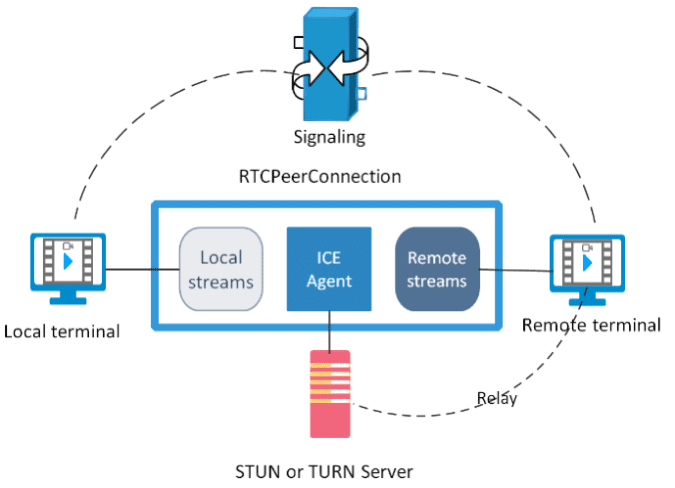
WebRTC is peer-to-peer for media traffic — after the signaling phase completes, audio and video streams flow directly between clients without passing through a central media server. The WebRTC specification (W3C WebRTC 1.0) defines this P2P media transport as the default connection model, using DTLS-SRTP encryption on the direct path between peers.
However, WebRTC is not fully serverless. Three server components remain necessary even in pure P2P mode:
- Signaling server — exchanges SDP offers, answers, and ICE candidates between peers before the direct connection is established
- STUN server — provides each client with its public IP address and port, enabling NAT traversal
- TURN server — relays media when direct P2P connectivity fails (symmetric NATs, restrictive firewalls)
Once ICE negotiation succeeds, the signaling server’s role ends and media flows P2P. If TURN relay is required, media routes through the TURN server — this is still considered WebRTC P2P architecture, though the media path is no longer direct.
How Does WebRTC Peer-to-Peer Communication Work?
WebRTC P2P communication works through a 5-stage sequence: media preparation, SDP offer creation, SDP answer creation, ICE candidate exchange, and direct connection establishment. Each stage must complete before media can flow between clients.
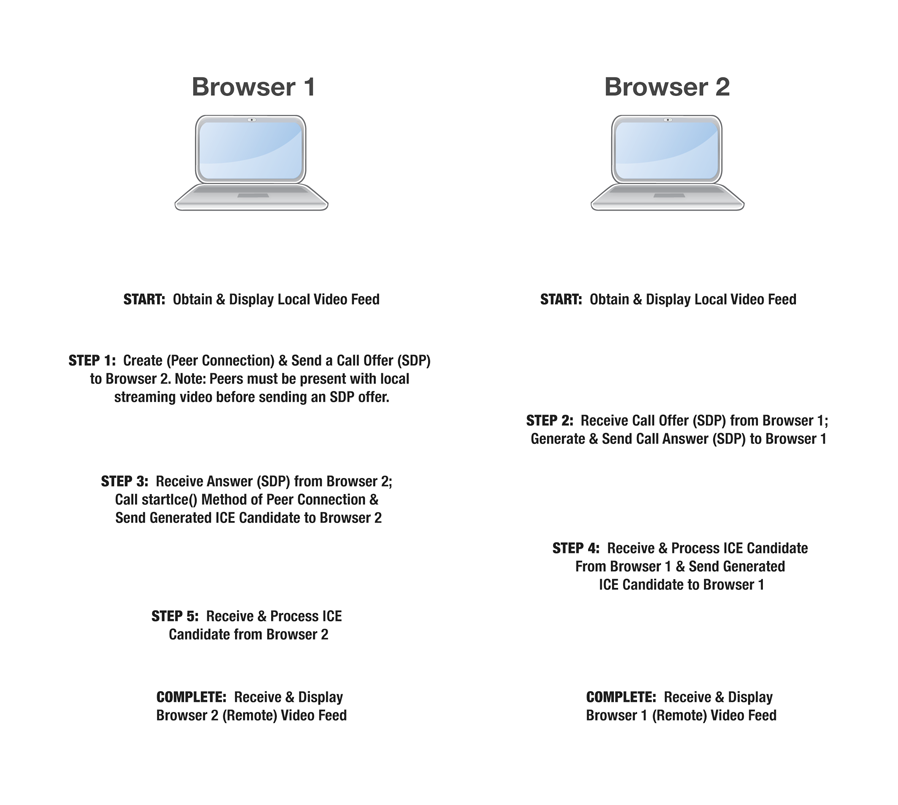
What Are the 5 Stages of WebRTC P2P Connection Setup?
WebRTC establishes a P2P connection through the following ordered stages:
- Media preparation — Both peers access local media sources (camera, microphone) using the
getUserMedia()API and attach tracks to anRTCPeerConnectionobject. - Offer creation — The initiating peer generates an SDP (Session Description Protocol) offer describing its supported codecs, media formats, and network capabilities, then sends it through the signaling channel.
- Answer creation — The receiving peer processes the SDP offer, generates an SDP answer with its own capabilities, and returns it through the signaling channel.
- ICE candidate exchange — Both peers gather ICE (Interactive Connectivity Establishment) candidates — network address/port combinations — and exchange them through the signaling server. The ICE agent selects the optimal connection path.
- Direct connection established — After ICE negotiation completes and a compatible path is confirmed, DTLS-SRTP handshake secures the connection and media flows directly P2P.
After stage 5, the signaling server handles no further traffic for that session. All audio and video data travels over the encrypted P2P path determined during ICE negotiation.
What Role Do STUN and TURN Servers Play in P2P Connections?
STUN servers resolve each peer’s public IP address for NAT traversal, while TURN servers relay media when a direct P2P path cannot be established. Most WebRTC deployments require both: STUN for the majority of connections and TURN as a fallback for users behind symmetric NATs or enterprise firewalls.
How Does STUN Enable P2P Connectivity?
STUN (Session Traversal Utilities for NAT) works by sending a binding request from the client to the STUN server. The STUN server returns the client’s public-facing IP address and port — information the client cannot determine on its own behind a NAT. This public address is then included in the ICE candidate list for potential P2P connection paths.
When Does WebRTC Fall Back to TURN Relay?
TURN (Traversal Using Relays around NAT) relay activates when STUN-based direct connectivity fails. Symmetric NAT configurations — where the external port mapping changes for each destination — block STUN-based hole punching. According to Kranky Geek WebRTC Survey data, approximately 15–20% of WebRTC connections require TURN relay in production deployments. TURN relay increases latency by 20–80ms compared to direct P2P paths, depending on TURN server geographic proximity.
| Component | Function | Media Traffic | Required |
|---|---|---|---|
| Signaling server | SDP and ICE exchange | No — signaling only | Always |
| STUN server | Public IP/port discovery | No — coordination only | Always |
| TURN server | Media relay fallback | Yes — when P2P fails | ~15–20% of connections |
| Media server (SFU) | Stream routing and transcoding | Yes — all connections | Only for 1-to-N or N-to-N |
How to Establish a WebRTC P2P Connection Using Ant Media Server
Ant Media Server handles P2P signaling through its WebSocket interface, routing SDP and ICE messages between peers without relaying media. The JavaScript, Android, and iOS SDKs each expose P2P communication methods that abstract the WebSocket messaging layer described below.
Ant Media Server supports three WebRTC communication models — P2P (1-to-1), broadcast (1-to-N), and conference (N-to-N) — within the same server infrastructure. P2P mode activates when both peers connect to the same stream ID and the server detects a second participant joining.
What Is the WebSocket Endpoint for P2P Communication?
Both peers connect to Ant Media Server through the WebSocket endpoint corresponding to the target application:
ws://SERVER_NAME:5080/WebRTCAppEE/websocket
For SSL-enabled deployments (required for production), use wss:// on port 5443. SSL configuration for Ant Media Server is documented in the SSL setup guide.
WebRTC P2P Example: Full WebSocket Message Sequence
A complete WebRTC P2P session through Ant Media Server requires 7 WebSocket message exchanges: join, start, offer SDP, answer SDP, ICE candidates (multiple), and leave. The following example shows the exact JSON command structure for each step.
Step 1: Peer Joins the Stream
Both peers independently send the join command with a shared stream ID. The stream ID acts as the rendezvous point — the server matches the two peers by this identifier.
{
    "command" : "join",
    "streamId" : "stream1"
}
Step 2: Server Notifies First Peer to Start
When the second peer joins, Ant Media Server sends a start command to the first peer, signaling that a remote participant is ready. This triggers offer creation on the initiating peer.
{
    "command" : "start",
    "streamId" : "stream1"
}
Step 3: First Peer Sends SDP Offer
The first peer creates an SDP offer via RTCPeerConnection.createOffer() and relays it to the second peer through Ant Media Server using the takeConfiguration command.
{
   "command" : "takeConfiguration",
   "streamId" : "stream1",
   "type" : "offer",
   "sdp" : "${SDP_PARAMETER}"
}
Step 4: Second Peer Sends SDP Answer
The second peer processes the offer, calls RTCPeerConnection.createAnswer(), and returns the answer SDP through the same takeConfiguration command with type: "answer".
{
   "command" : "takeConfiguration",
   "streamId" : "stream1",
   "type" : "answer",
   "sdp" : "${SDP_PARAMETER}"
}
Step 5: ICE Candidate Exchange
Each peer sends multiple takeCandidate messages as the ICE agent discovers network paths. The label field corresponds to the SDP media line index (sdpMLineIndex) and id to the SDP mid value.
{
    "command" : "takeCandidate",
    "streamId" : "stream1",
    "label" : "${CANDIDATE.SDP_MLINE_INDEX}",
    "id" : "${CANDIDATE.SDP_MID}",
    "candidate" : "${CANDIDATE.CANDIDATE}"
}
Step 6: Peer Leaves the Session
Either peer terminates the P2P session by sending the leave command. The server notifies the remaining peer that the remote participant has disconnected.
{
    "command" : "leave",
    "streamId": "stream1"
}
P2P Signaling Flow Summary
The complete signaling sequence follows this pattern:
- Ant Media Server routes SDP and ICE messages between peers — it never touches media data
- SDP negotiation defines the codec and media format agreement between both peers
- ICE candidate exchange determines the optimal direct network path
- After ICE completes, all audio and video traffic flows peer-to-peer with DTLS-SRTP encryption
A live example of this message sequence runs on the Ant Media test server — open two browser tabs to observe the full join/offer/answer/ICE cycle in real time using browser DevTools WebSocket inspector.
When Should You Use P2P Instead of an SFU or MCU?
WebRTC P2P is correct for 1-to-1 calls and sessions with 2–4 participants where server bandwidth cost and sub-500ms latency are the priorities. Beyond 4 participants, the bandwidth requirement on each peer scales quadratically — a 6-person P2P mesh requires each peer to upload 5 simultaneous streams, which exhausts typical upload capacity.
An SFU (Selective Forwarding Unit) architecture routes streams through a central server, eliminating the upload scaling problem at the cost of adding one network hop. For deployments requiring more than 4 concurrent participants, an SFU delivers better quality with lower per-client resource consumption. Ant Media Server operates as an SFU for its conference room solution, supporting N-to-N WebRTC sessions at scale without the bandwidth constraints of a full P2P mesh.
| Architecture | Optimal participant count | Server bandwidth | Latency | Use cases |
|---|---|---|---|---|
| P2P | 2–4 | None (signaling only) | Sub-100ms direct | 1:1 video calls, small group |
| SFU | 4–100+ | High (all streams) | Sub-200ms with 1 hop | Video conferencing, webinars |
| MCU | Any | High (transcoding) | 200–500ms | Composite video, recording |
For applications requiring both P2P flexibility and the ability to scale to broadcast-level viewers, Ant Media Server supports WebRTC-to-HLS conversion — a P2P session can be simultaneously recorded and distributed as an HLS stream to thousands of concurrent viewers without changing the P2P signaling architecture for the primary session participants.
Developers evaluating whether P2P meets their latency requirements can validate sub-100ms glass-to-glass performance directly using Ant Media Server’s 14-day P2P streaming trial — the free trial includes full access to WebRTC P2P signaling infrastructure, STUN/TURN configuration, and the JavaScript SDK for testing your specific network conditions without committing to a production deployment.
Frequently Asked Questions About WebRTC Peer-to-Peer Communication
Is WebRTC always peer-to-peer?
Does Ant Media Server relay media in WebRTC peer-to-peer mode?
What is an ICE candidate in WebRTC?
Why does WebRTC P2P fail through some firewalls?
What is the maximum number of participants for WebRTC P2P?
Can WebRTC peer-to-peer connections work across different networks?
What is the difference between SDP offer and SDP answer in WebRTC?
How do I test a WebRTC P2P connection?
Conclusion
WebRTC P2P communication uses a 7-step WebSocket signaling sequence — join, start, SDP offer, SDP answer, ICE candidates, and leave — to establish direct encrypted media connections between clients. Ant Media Server handles the signaling layer without touching media traffic, making it a lightweight signaling infrastructure for 1-to-1 video calls, small group sessions, and any use case where sub-100ms latency and zero server-side media relay are the requirements.
P2P connections scale reliably up to 4 participants; beyond that threshold, SFU architecture eliminates the upload bandwidth bottleneck. STUN and TURN server configuration determines real-world connectivity rates — TURN relay over TCP 443 handles the ~15–20% of connections where direct P2P paths fail.
For applications requiring both P2P flexibility and the ability to scale to broadcast audiences, the WebRTC-to-HLS conversion pipeline in Ant Media Server supports simultaneous P2P sessions and HLS distribution without architectural changes. Developers can validate P2P signaling behavior, ICE negotiation performance, and STUN/TURN configuration against their specific network topology using Ant Media Server’s 14-day WebRTC infrastructure trial — no production commitment required.