
Amazon CloudFront scales HLS live streaming to millions of concurrent viewers by caching MPEG-TS segments at 600+ global edge locations, reducing origin server load by up to 95% compared to direct delivery. Ant Media Server functions as the CloudFront origin, ingesting RTMP or WebRTC streams and generating the HLS manifest and segments that CloudFront distributes globally.
This guide covers the complete 7-step CloudFront distribution setup, cache policy configuration, error page TTL tuning, and HLS stream delivery validation using Ant Media Server as the origin.
What Is HLS Streaming?
HTTP Live Streaming (HLS) is an HTTP-based adaptive bitrate streaming protocol developed by Apple Inc. and released in 2009. HLS streaming works by segmenting a video stream into small MPEG-TS or fMP4 chunks (typically 2–6 seconds each) and serving them alongside an M3U8 playlist manifest over standard HTTP connections. Because HLS uses HTTP, it passes through firewalls, load balancers, and CDN edge caches without special protocol handling—making it the dominant protocol for large-scale live stream delivery.
HLS supports multiple quality renditions within a single master playlist, enabling players to switch bitrates automatically based on available bandwidth. This adaptive bitrate mechanism ensures uninterrupted playback across network conditions ranging from 500 Kbps mobile connections to 20 Mbps broadband.
What Is CDN HLS Streaming?
CDN HLS streaming distributes HLS segment files and M3U8 manifests through geographically distributed edge servers rather than serving all requests from a single origin. When a viewer requests an HLS stream, the CDN serves cached segments from the nearest edge node instead of routing the request to the origin media server. This model reduces origin bandwidth consumption, lowers segment delivery latency to end-users, and eliminates single-point-of-failure risk for large concurrent audiences.
CDN HLS streaming handles audience spikes that would overwhelm a direct-delivery architecture. A single Ant Media Server origin node can support 3,000–5,000 concurrent HLS viewers under direct delivery; behind a CDN like CloudFront, the same origin node supports unlimited viewers because CDN edge servers absorb nearly all segment request traffic after the initial cache population.
What Is Amazon CloudFront?
Amazon CloudFront is AWS’s globally distributed CDN service, operating 600+ points of presence across 100+ countries. CloudFront delivers HTTP and HTTPS content—including HLS stream segments, fMP4 CMAF chunks, and static VOD files—from edge locations closest to each viewer. CloudFront integrates natively with other AWS services (S3, EC2, Elastic Load Balancing) and supports custom origins like Ant Media Server instances running on any infrastructure.
For live HLS streaming, CloudFront functions as a transparent proxy between viewers and the Ant Media Server origin: it caches HLS segments for the configured TTL duration, refreshes them on expiry, and serves subsequent requests from cache without hitting the origin. This architecture keeps per-viewer bandwidth cost at CloudFront’s edge transfer pricing, which is significantly lower than equivalent EC2 egress costs at scale.
How Does CloudFront Compare to Direct HLS Delivery?
CloudFront HLS delivery outperforms direct origin delivery on every dimension relevant to live streaming at scale. The table below compares key operational metrics across both delivery architectures using Ant Media Server as the origin.
| Metric | Direct Origin Delivery | CloudFront CDN Delivery |
|---|---|---|
| Maximum concurrent viewers (single origin) | 3,000–5,000 | Unlimited (edge-absorbed) |
| Origin bandwidth per 1,000 viewers | Full bitrate × 1,000 | Full bitrate × ~20 (cache misses only) |
| Segment delivery latency (distant viewers) | 50–200ms RTT added | 5–30ms RTT from nearest edge |
| Origin server CPU at 10K viewers | High (direct TCP per viewer) | Low (CDN handles TCP termination) |
| Geographic redundancy | None (single AZ unless clustered) | 600+ PoPs globally |
| Cost per GB at 10TB/month egress | ~$0.09/GB (EC2 egress) | ~$0.02–0.085/GB (CloudFront tiered) |
The cost difference becomes decisive at volumes above 5TB/month: CloudFront’s volume pricing tiers reduce per-GB cost by 40–75% compared to EC2 egress pricing, while simultaneously removing the capacity constraint that limits direct-delivery scalability.
How to Set Up CloudFront HLS Streaming with Ant Media Server in 7 Steps
The following setup requires an active Ant Media Server installation (on any server or cloud instance) and an AWS account with CloudFront access. The complete configuration takes approximately 15–20 minutes, with an additional 5–15 minutes for the CloudFront distribution to deploy globally after creation.
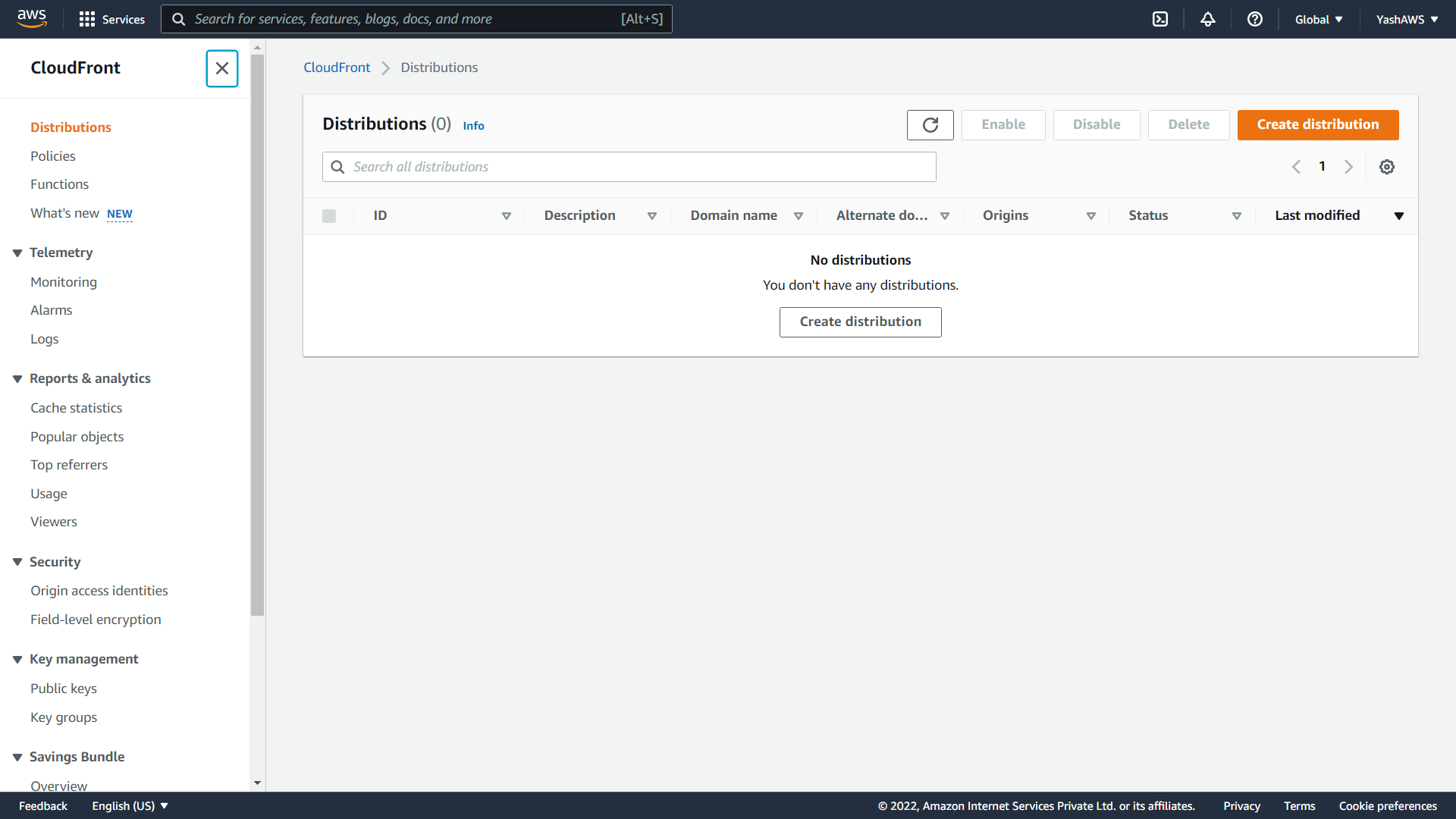
Step 1: Open CloudFront and Create a Distribution
Log in to the AWS Management Console, navigate to CloudFront, and click Create Distribution.
Step 2: Configure the Origin Domain and Path
Fill in the origin settings using the values below. These fields connect CloudFront to your Ant Media Server instance as the HLS origin.
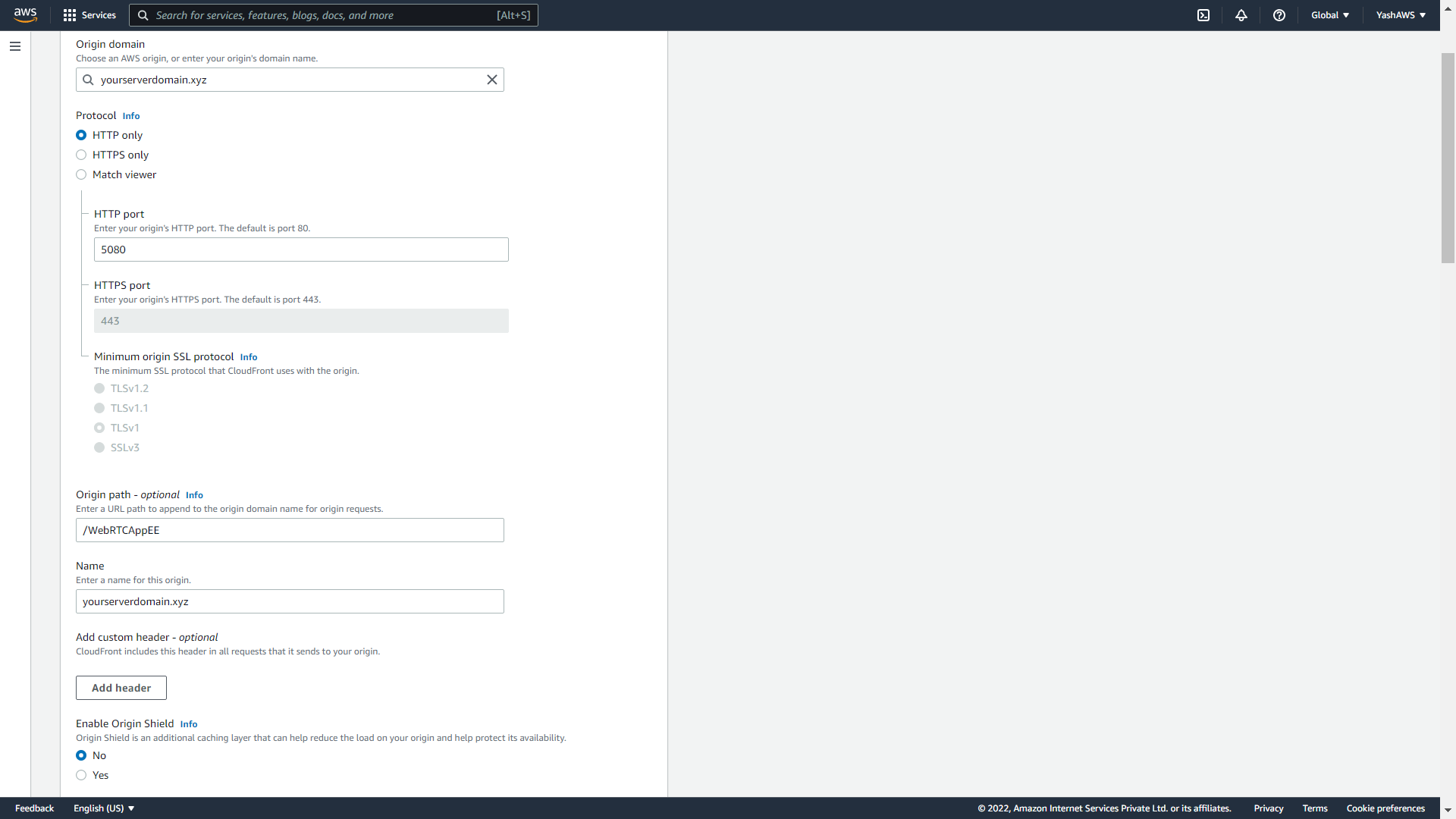
- Origin Domain Name — your Ant Media Server domain or IP address (e.g.,
streaming.yourdomain.com) - Origin Path — the Ant Media Server application name (e.g.,
/WebRTCAppEEor/LiveApp) - HTTP Port —
5080(Ant Media Server default HTTP port) - HTTPS Port —
5443(if using SSL on the origin) - Origin Protocol Policy — set to
HTTP Onlyfor non-SSL origins; set toHTTPS Onlyif SSL is configured on Ant Media Server
Step 3: Configure Default Cache Behavior
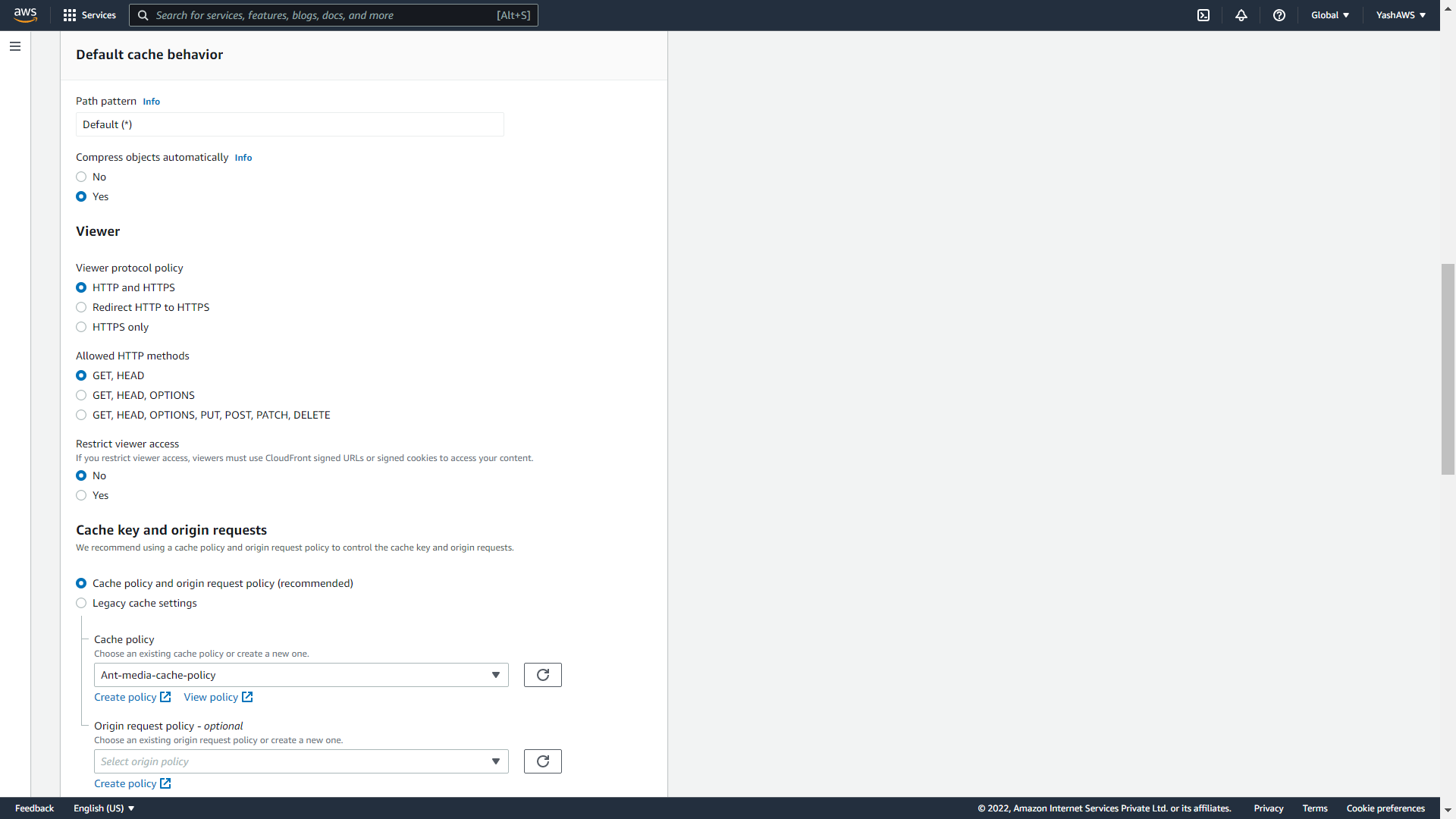
In the Default Cache Behavior section, keep all fields at their defaults except Cache Policy. Click Create Policy to create a custom cache policy with the settings shown below.
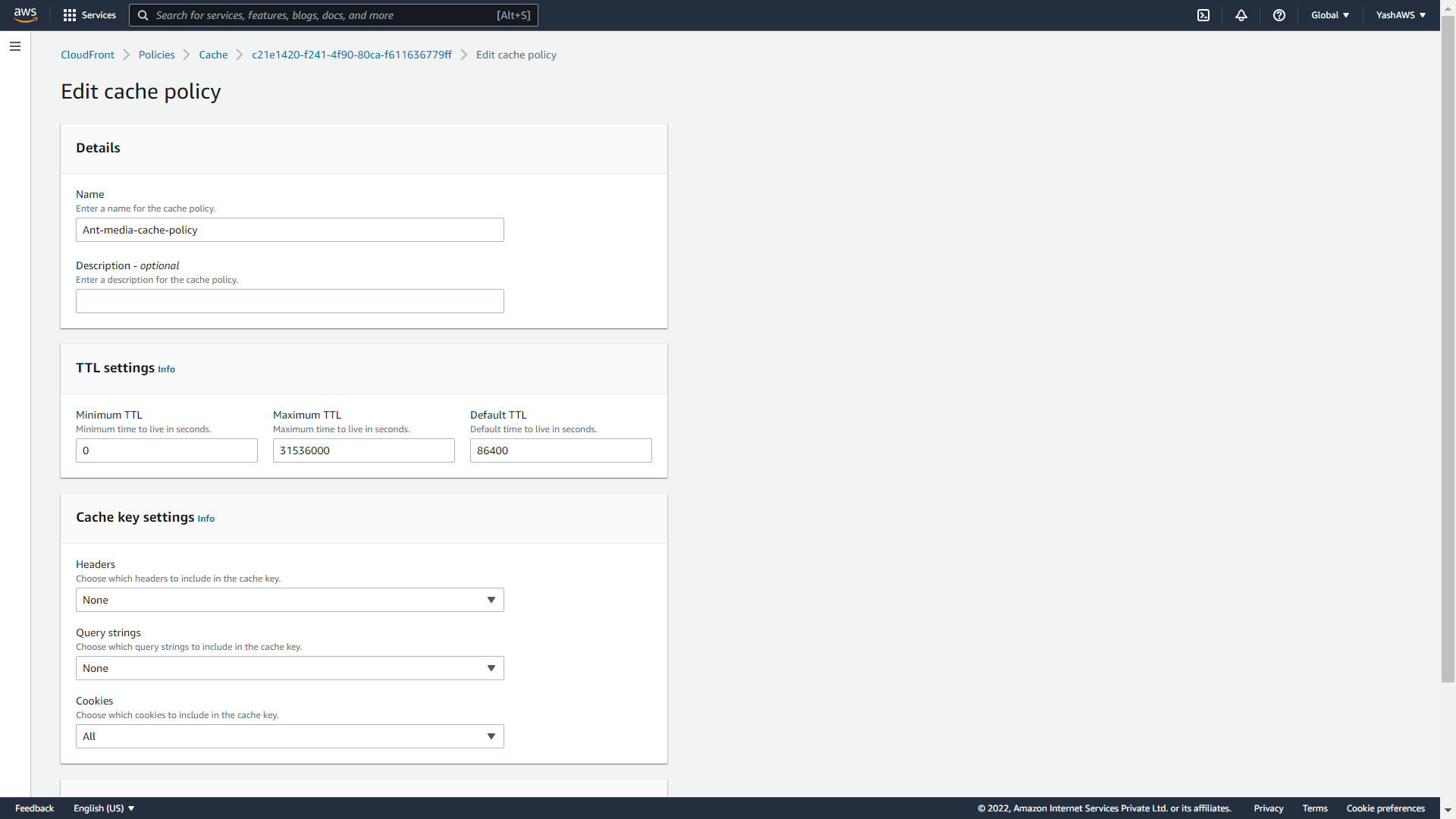
For live HLS streaming, set the Minimum TTL to 0, Default TTL to 3 seconds, and Maximum TTL to 3 seconds. These values match a typical HLS segment duration of 2–4 seconds, ensuring CloudFront fetches fresh segment lists from the origin frequently enough to keep playback current without overwhelming the origin with requests.
Step 4: Disable Web Application Firewall (WAF)
In the Web Application Firewall section, select Do not enable security protections. WAF adds per-request cost and can interfere with HLS segment delivery patterns. You can enable WAF selectively on specific behaviors later if the production deployment requires it.
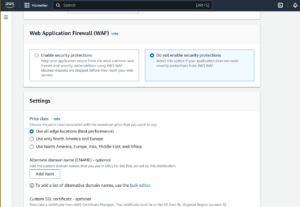
After disabling WAF, click Create Distribution. The distribution appears in the CloudFront console with status Deploying.
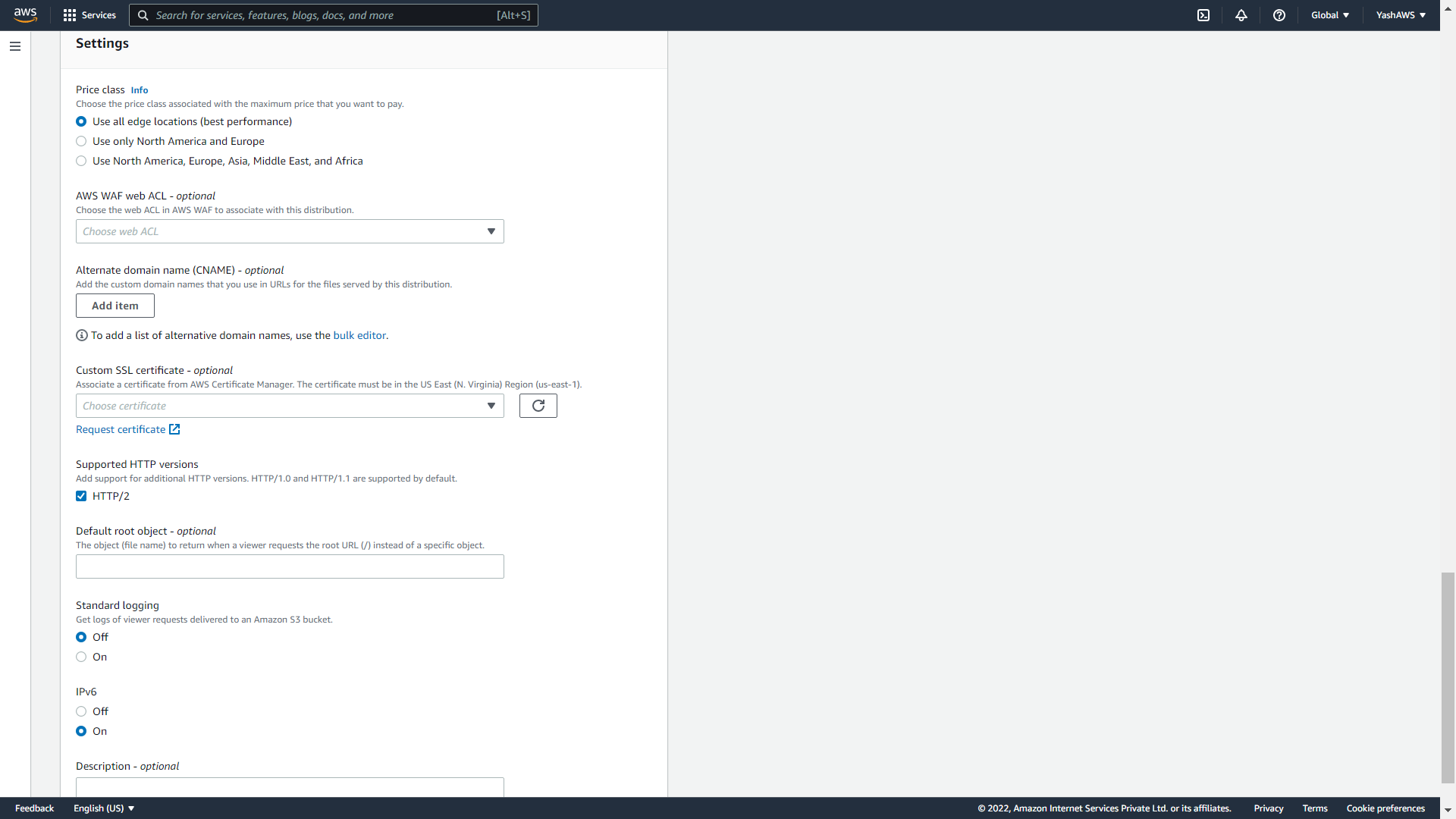
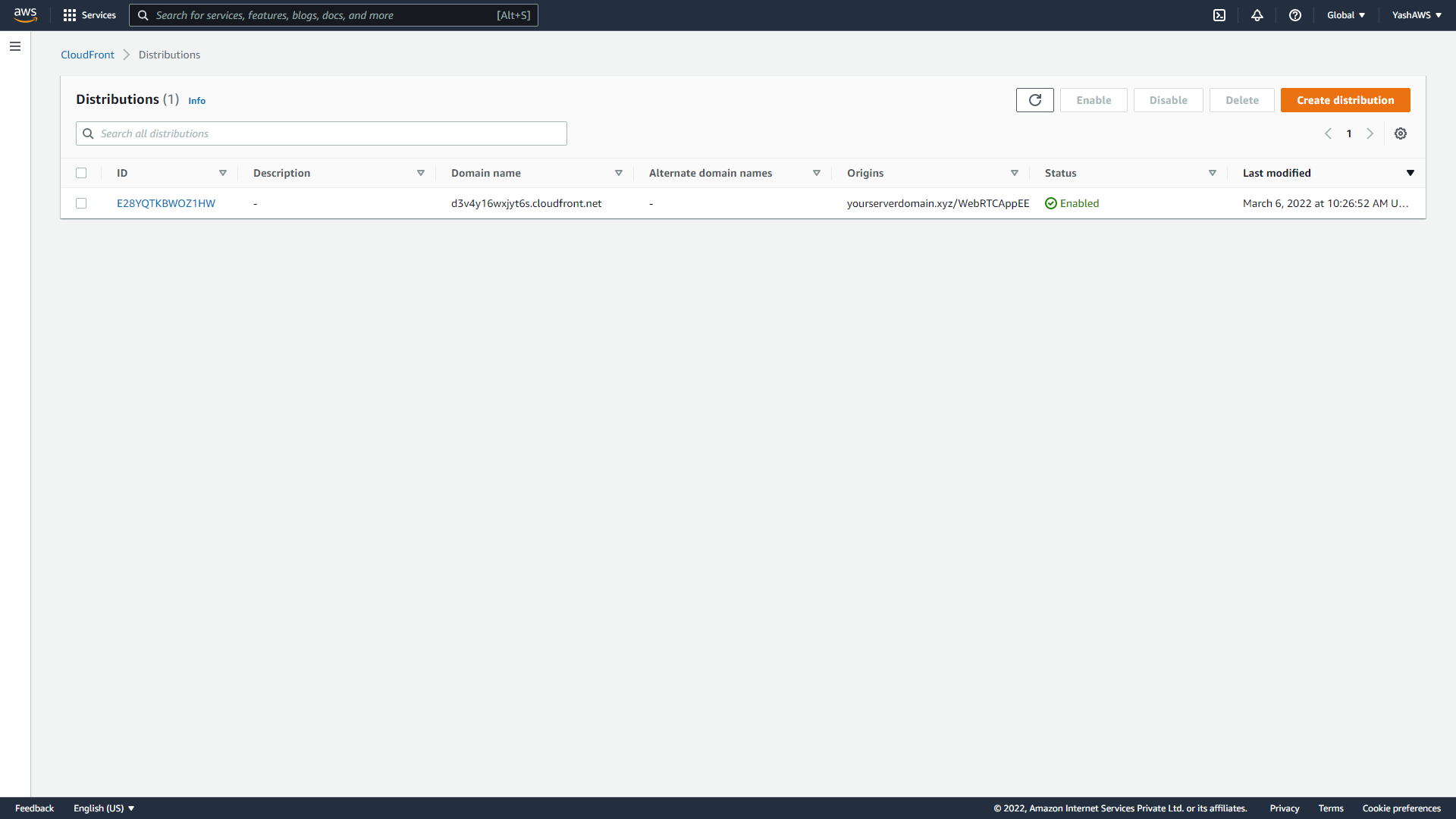
Step 5: Set Error Page Cache TTL to 3 Seconds
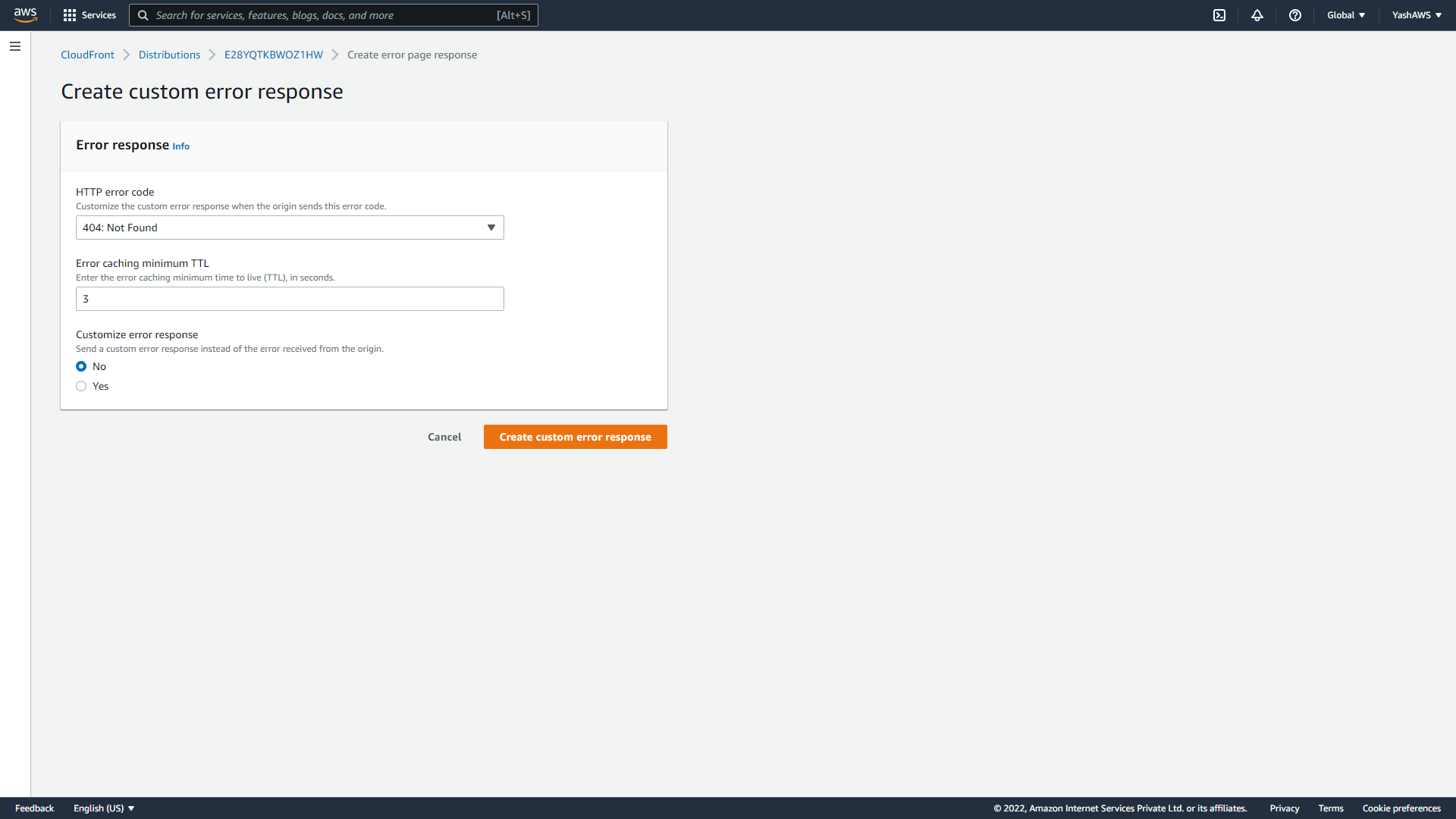
Click the distribution ID to open its settings, then navigate to the Error Pages tab and click Create Custom Error Response.
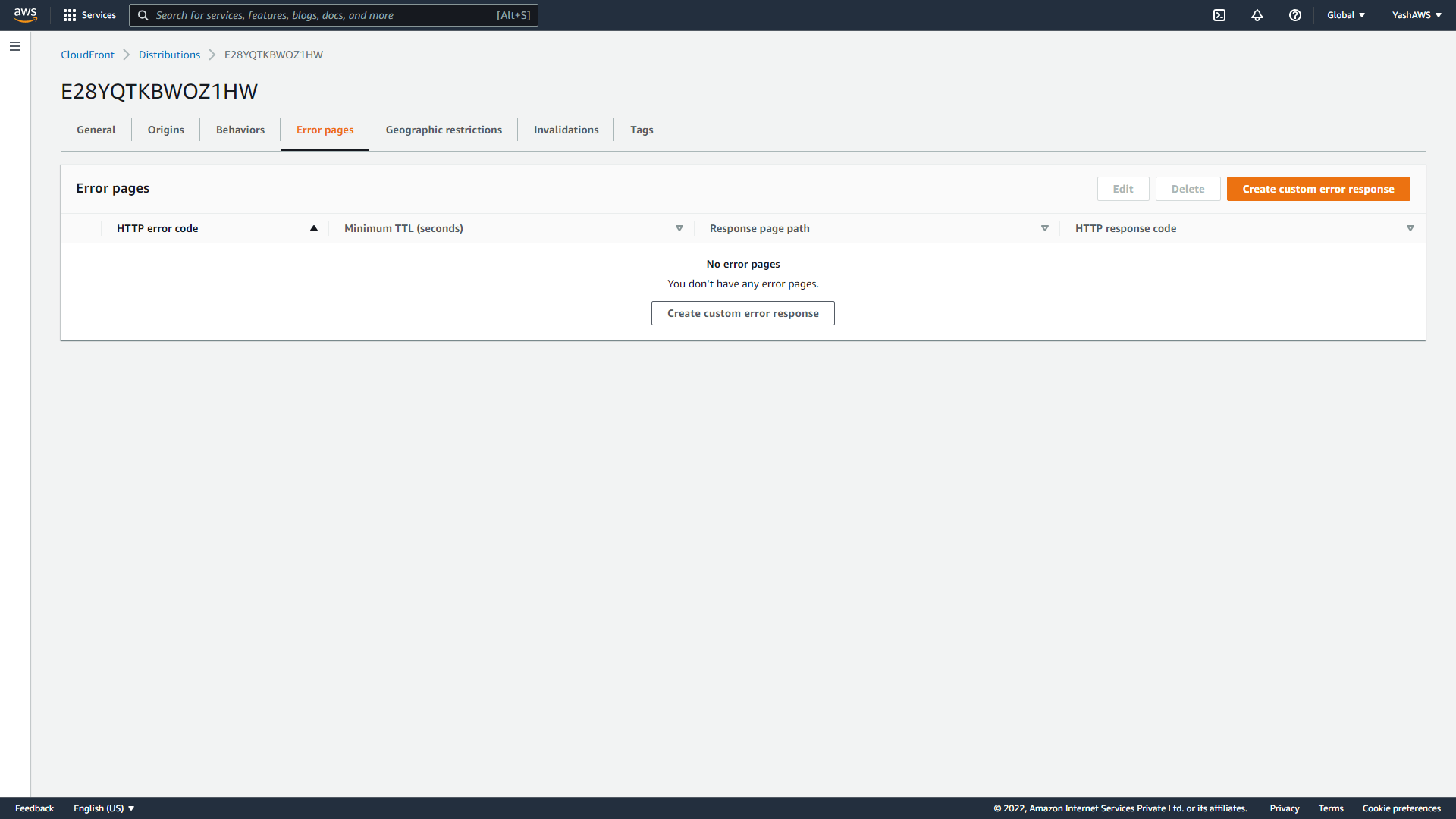
Set HTTP Error Code to 404: Not Found and Error Caching Minimum TTL to 3 seconds, then click Create. Without this configuration, CloudFront caches 404 responses for the default TTL (300 seconds), which causes player errors when a stream starts and the first segment requests return 404 before the HLS manifest is ready.
Step 6: Wait for Distribution Deployment and Note the Domain Name
CloudFront distributions take 5–15 minutes to propagate to all edge locations. Wait until the Status column shows Deployed, then copy the Domain Name assigned to your distribution (format: xxxxxxxxxx.cloudfront.net).
Step 7: Publish a Live Stream and Build the CloudFront HLS Playback URL
Publish a live stream to Ant Media Server using OBS Studio, WebRTC, or any RTMP encoder. Note the Stream ID assigned by Ant Media Server. Construct the HLS playback URL using your CloudFront domain name and stream ID in the following format:
http://your_cloudfront_domain.cloudfront.net/play.html?id=your_stream_id&playOrder=hlsExample with a real CloudFront domain and stream ID:
http://d3v4y16wxjyt6s.cloudfront.net/play.html?id=061715642936790404147981&playOrder=hlsOpen this URL in a browser. The HLS stream loads and plays through CloudFront CDN delivery. Verify CDN delivery by checking the response headers in browser developer tools: the x-cache header shows Hit from cloudfront on cached segment responses.
Does Amazon CloudFront Support RTMP Streaming?
Amazon CloudFront no longer supports RTMP distributions — AWS retired CloudFront RTMP delivery on December 31, 2020. CloudFront now exclusively supports HTTP and HTTPS-based delivery, which covers HLS, DASH, CMAF, and WebRTC-to-HLS workflows but not raw RTMP stream delivery to viewers.
RTMP remains fully supported as an ingest protocol from encoders to Ant Media Server. The workflow is: RTMP encoder (OBS, Wirecast, FFmpeg) → Ant Media Server origin (RTMP ingest, HLS transcoding) → CloudFront CDN (HLS segment distribution) → viewers. Ant Media Server converts the RTMP ingest stream into HLS segments, which CloudFront then distributes. This WebRTC/RTMP to HLS conversion pipeline is the standard architecture for cloud-scale live streaming.
If your architecture requires RTMP delivery to end-users (legacy set-top boxes, broadcast integrations), Ant Media Server supports RTMP playback directly—but this traffic bypasses CloudFront and must be served from the origin or a separate TCP-capable load balancer.
What Does CloudFront Live Streaming Cost?
CloudFront live streaming pricing consists of two components: data transfer out (per GB delivered to viewers) and HTTP request charges (per 10,000 requests). The table below shows approximate costs for a 1 Mbps HLS stream delivered to different audience sizes, based on AWS CloudFront US/EU pricing as of 2026.
| Concurrent Viewers | Stream Bitrate | Monthly Data (GB) | Estimated CloudFront Cost/Month |
|---|---|---|---|
| 100 | 1 Mbps | ~324 GB | ~$27 |
| 1,000 | 1 Mbps | ~3,240 GB | ~$270 |
| 10,000 | 1 Mbps | ~32,400 GB | ~$1,700 (volume tier) |
| 100,000 | 1 Mbps | ~324,000 GB | ~$13,000 (bulk tier) |
CloudFront’s volume pricing tiers reduce per-GB cost from $0.085 (first 10TB) to $0.02 (over 5PB) for US/EU delivery. Actual costs vary by viewer geography: Asia-Pacific and South America regions carry higher per-GB rates than US/EU. The Ant Media cost calculator compares total streaming infrastructure cost including origin server, CDN, and bandwidth across audience sizes.
How Does Adaptive Bitrate Streaming Work with CloudFront?
Adaptive bitrate streaming with CloudFront requires Ant Media Server to generate a multi-rendition HLS master playlist containing separate quality tracks (e.g., 360p/500Kbps, 720p/2Mbps, 1080p/4Mbps). CloudFront caches each rendition’s segments independently at edge nodes, allowing players to switch quality levels without re-requesting uncached segments from the origin.
Ant Media Server’s adaptive bitrate transcoding generates the multi-rendition ladder automatically when ABR is enabled in the application settings. The master playlist URL follows the same CloudFront delivery path as single-bitrate HLS—the player fetches the master manifest, selects the appropriate rendition based on bandwidth measurement, and requests segments from the corresponding CloudFront-cached rendition stream.
For GPU-accelerated ABR transcoding at scale, Ant Media Server supports NVIDIA CUDA and Intel QuickSync hardware encoding, which reduces CPU load per transcoded rendition by 60–80% compared to software encoding—a critical factor when running the Ant Media Server origin on cost-optimized cloud instances behind CloudFront.
Frequently Asked Questions
Why should I use Amazon CloudFront with Ant Media Server for HLS streaming?
Does CloudFront reduce HLS streaming latency?
Do I need SSL to use CloudFront with Ant Media Server?
Why is the error cache TTL set to 3 seconds for live HLS?
Can CloudFront deliver RTMP streams to viewers?
How does CloudFront handle adaptive bitrate HLS streams?
How does Ant Media Server compare to Wowza with CloudFront?
Conclusion
Amazon CloudFront with Ant Media Server delivers a production-grade CDN HLS streaming architecture in 7 configuration steps. CloudFront’s 600+ edge locations cache HLS segments at 3-second TTL intervals, scaling live stream delivery to unlimited concurrent viewers from a single Ant Media Server origin node. The RTMP ingest-to-HLS-distribution pipeline handles any encoder source, while Ant Media Server’s adaptive bitrate transcoding generates multi-rendition master playlists that CloudFront distributes independently per rendition.
For teams evaluating this architecture hands-on, Ant Media Server’s HLS origin configuration is available for 14 days on a self-hosted free trial—test CloudFront origin setup, segment cache behavior, and multi-rendition ABR delivery against your actual stream sources before committing infrastructure costs.
For further scale beyond a single origin, the HLS delivery scaling guide with S3 and CloudFront covers multi-origin clustering, S3-backed VOD segment storage, and CloudFront geo-restriction configuration for regional content delivery compliance.