
Centralized logging for media servers is the difference between finding a streaming issue in 2 minutes and spending 2 hours SSH-ing into servers one by one. When your Ant Media Server deployment spans multiple instances or a Kubernetes cluster, logs are scattered everywhere — and problems hide in the gaps between them.
Ant Media’s centralized logging infrastructure collects logs from your environment, forwards them securely to a multi-tenant logging platform, and makes them instantly searchable. The Ant Media team can then troubleshoot issues proactively — often before you even notice something is wrong.
This guide covers both deployment types: standalone instances (VM, bare metal, cloud VM) using a shell script, and Kubernetes clusters using Fluent Bit via Helm. The setup can be completed either by you or by the Ant Media team.
Why Centralized Logging for Media Servers Matters
When something goes wrong with a live stream — a dropped connection, a codec failure, a WebRTC handshake error — the answer is always in the logs. The question is how fast you can get to it.
⚡Faster Troubleshooting
Search across all server logs from one place instead of SSH-ing into each instance individually. Mean time to resolution drops dramatically.
🔍Proactive Monitoring
The Ant Media team can detect error patterns before they impact your streams — rather than waiting for you to file a support ticket.
🏗️Works at Any Scale
Whether you’re running a single VM or a full Kubernetes cluster, the same centralized logging infrastructure handles both environments.
🔒Privacy by Design
Only operational text-based logs are collected — no stream content, no user data, no media files. Your content stays yours.
How the Centralized Logging Infrastructure Works
The logging agent runs on your server and forwards operational logs to a secure, multi-tenant logging platform. Here’s the full data flow for centralized logging for media servers:
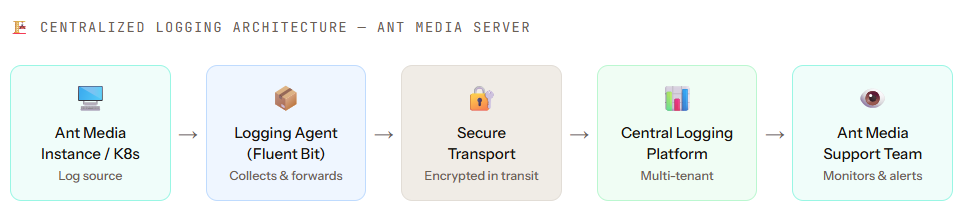
The logging agent (shell script for instances, Fluent Bit for Kubernetes) runs on your server and forwards only operational logs to the central platform. The Ant Media support team monitors this platform to detect issues and respond proactively without needing access to your server directly.
Supported Environments
Centralized logging for media servers works across both major deployment types:
VMs, bare metal servers, or cloud VMs running Ant Media Server. Setup is done via a single shell script that downloads and configures the logging agent automatically.
K8s clusters running Ant Media Server pods. Setup uses Fluent Bit deployed via Helm — the standard Kubernetes-native approach for log collection and forwarding.
Prerequisites
Requirements vary by environment. Check the column that matches your setup.
| Instance-Based | Kubernetes |
|---|---|
🔑 Root or sudo access to the server |
⎈ Helm v3 or v4 installed on your machine |
| 🌐 Outbound network access to the Central Logging endpoint | 🔐 Cluster-admin or sufficient RBAC permissions |
| 📧 Centralized logging credentials from the Ant Media team (Tenant Email, Username, Password) | 📧 Centralized logging credentials from the Ant Media team (Tenant Email, Username, Password) |
ℹ️Your centralized logging credentials (Tenant Email, Username, Password) are provided by the Ant Media team. Contact Ant Media support to request them before starting.
01. Contact Ant Media for Logging Credentials
Before installing the centralized logging agent, you need three credentials from the Ant Media team. These are used to configure secure log forwarding from your server to the central logging platform.
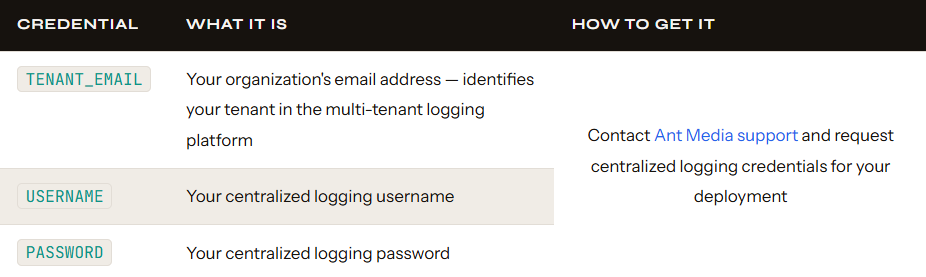
💡We, the Ant Media team, can also complete the entire setup for you if you prefer. Just share your server access details, and we will handle Steps 2 and 3 on your behalf.
Once you have your credentials, proceed to Step 2 for your environment type — 2A for standalone instances or 2B for Kubernetes clusters.
2A. Install the Logging Agent — Standalone Instance
The centralized logging agent for standalone instances is installed via a shell script. The script downloads, configures, and starts the logging agent automatically — no manual configuration required.
Run the following commands on your Ant Media Server instance to download and make the script executable:
curl -O https://raw.githubusercontent.com/ant-media/Scripts/refs/heads/master/central-logging/install_central-logging.sh
chmod +x install_central-logging.sh
Execute the script with sudo:
sudo ./install_central-logging.sh
During execution, the script will interactively prompt you for your three credentials:
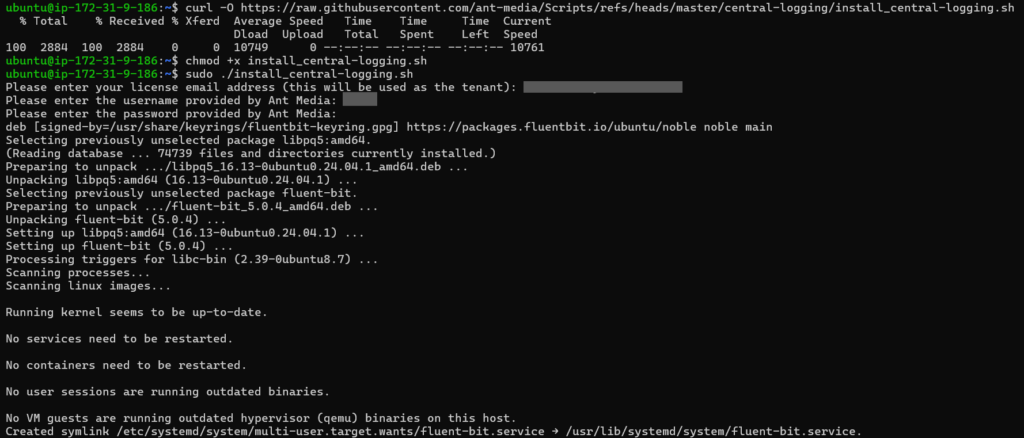
✅ That’s it for standalone instances. The script handles everything — installing the agent, configuring the credentials, and starting the log forwarding service. Proceed to Step 3 to verify.
2B. Install Fluent Bit via Helm — Kubernetes Cluster
For Kubernetes environments, Fluent Bit is deployed as a DaemonSet using Helm — the standard Kubernetes-native approach. Fluent Bit runs on every node in your cluster and collects logs from all Ant Media Server pods automatically.
- First, download the pre-configured Fluent Bit values file from Ant Media’s GitHub and add the Fluent Helm chart repository:
wget https://raw.githubusercontent.com/ant-media/Scripts/refs/heads/master/central-logging/values_central-logging.yaml
helm repo add fluent https://fluent.github.io/helm-charts
helm repo update
- Run the Helm install command, replacing the three placeholder values with your actual credentials from Step 1:
helm upgrade --install fluent-bit fluent/fluent-bit \
  -f values_central-logging.yaml \
  --set TENANT_EMAIL="[email protected]" \
  --set USERNAME="username" \
  --set PASSWORD="password"
Parameters Reference
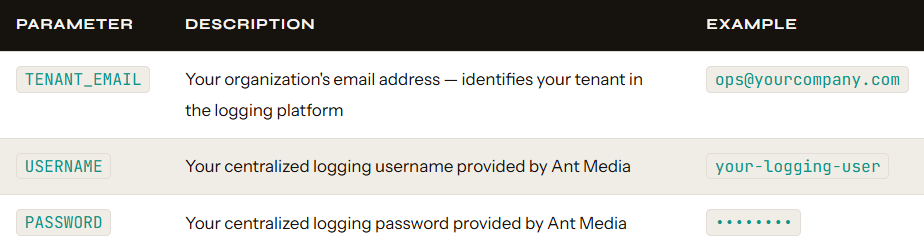
⎈ The helm upgrade --install command is idempotent — if Fluent Bit is already deployed, it updates the configuration. If it’s new, it installs it. You can safely re-run this command to rotate credentials or update the values file.
03. Verify the Installation & Confirm Logs Are Flowing
Verification differs between the two environments. For standalone instances you check a systemd service. For Kubernetes you check DaemonSet pods. Both paths end with the same two confirmation lines in the Fluent Bit output and the same final check with the Ant Media team.
3A — Standalone Instance Verification
- Check 1 — Confirm Fluent Bit Service is Running
The installation script installs Fluent Bit as a systemd service.
$ systemctl status fluent-bit
● fluent-bit.service - Fluent Bit
     Loaded: loaded (/usr/lib/systemd/system/fluent-bit.service; enabled; preset: enabled)
     Active: active (running) since Sun 2026-05-03 13:05:47 UTC; 38min ago
       Docs: https://docs.fluentbit.io/manual/
   Main PID: 4295 (fluent-bit)
      Tasks: 3 (limit: 9126)
     Memory: 4.3M (peak: 4.9M)
        CPU: 314ms
     CGroup: /system.slice/fluent-bit.service
             └─4295 /opt/fluent-bit/bin/fluent-bit -c //etc/fluent-bit/fluent-bit.conf

May 03 13:05:47 ip-172-31-9-186 fluent-bit[4295]: [2026/05/03 13:05:47.257] [ info] [cmetrics] version=2.1.2
May 03 13:05:47 ip-172-31-9-186 fluent-bit[4295]: [2026/05/03 13:05:47.257] [ info] [ctraces ] version=0.7.1
May 03 13:05:47 ip-172-31-9-186 fluent-bit[4295]: [2026/05/03 13:05:47.257] [ info] [input:tail:tail.0] initializing
May 03 13:05:47 ip-172-31-9-186 fluent-bit[4295]: [2026/05/03 13:05:47.257] [ info] [input:tail:tail.0] storage_strategy='memory' (memory only)
May 03 13:05:47 ip-172-31-9-186 fluent-bit[4295]: [2026/05/03 13:05:47.272] [ info] [input:tail:tail.0] multiline core started
May 03 13:05:47 ip-172-31-9-186 fluent-bit[4295]: [2026/05/03 13:05:47.275] [ info] [input:tail:tail.0] db: delete unmonitored stale inodes from the databa>
May 03 13:05:47 ip-172-31-9-186 fluent-bit[4295]: [2026/05/03 13:05:47.275] [ info] [output:****:****.0] configured, hostname=log.antmedia.io:80
May 03 13:05:47 ip-172-31-9-186 fluent-bit[4295]: [2026/05/03 13:05:47.275] [ info] [sp] stream processor started
May 03 13:05:47 ip-172-31-9-186 fluent-bit[4295]: [2026/05/03 13:05:47.275] [ info] [engine] Shutdown Grace Period=5, Shutdown Input Grace Period=2
May 03 13:05:47 ip-172-31-9-186 fluent-bit[4295]: [2026/05/03 13:05:47.277] [ info] [input:tail:tail.0] inotify_fs_add(): inode=296751 watch_fd=1 name=/var>
- Check 2 — Watch Live Log Forwarding
$ sudo journalctl -u fluent-bit -f
May 03 13:05:47 ip-172-31-9-186 fluent-bit[4295]: [2026/05/03 13:05:47.257] [ info] [cmetrics] version=2.1.2
May 03 13:05:47 ip-172-31-9-186 fluent-bit[4295]: [2026/05/03 13:05:47.257] [ info] [ctraces ] version=0.7.1
May 03 13:05:47 ip-172-31-9-186 fluent-bit[4295]: [2026/05/03 13:05:47.257] [ info] [input:tail:tail.0] initializing
May 03 13:05:47 ip-172-31-9-186 fluent-bit[4295]: [2026/05/03 13:05:47.257] [ info] [input:tail:tail.0] storage_strategy='memory' (memory only)
May 03 13:05:47 ip-172-31-9-186 fluent-bit[4295]: [2026/05/03 13:05:47.272] [ info] [input:tail:tail.0] multiline core started
May 03 13:05:47 ip-172-31-9-186 fluent-bit[4295]: [2026/05/03 13:05:47.275] [ info] [input:tail:tail.0] db: delete unmonitored stale inodes from the database: count=0
May 03 13:05:47 ip-172-31-9-186 fluent-bit[4295]: [2026/05/03 13:05:47.275] [ info] [output:****:****.0] configured, hostname=log.antmedia.io:80
May 03 13:05:47 ip-172-31-9-186 fluent-bit[4295]: [2026/05/03 13:05:47.275] [ info] [sp] stream processor started
May 03 13:05:47 ip-172-31-9-186 fluent-bit[4295]: [2026/05/03 13:05:47.275] [ info] [engine] Shutdown Grace Period=5, Shutdown Input Grace Period=2
May 03 13:05:47 ip-172-31-9-186 fluent-bit[4295]: [2026/05/03 13:05:47.277] [ info] [input:tail:tail.0] inotify_fs_add(): inode=296751 watch_fd=1 name=/var/log/antmedia/ant-media-server.log
- Check 3 — Confirm Fluent Bit Database Files Exist
Fluent Bit creates flb.db* files to track which log positions it has already forwarded. Their presence confirms it has started reading your Ant Media logs:
$ ls /usr/local/antmedia/log/
0.0.0.0_access.log  ant-media-server-analytics.log  ant-media-server.log  antmedia-error.log  flb.db  flb.db-shm  flb.db-wal
🔒 Credentials are stored in /etc/fluent-bit/fluent-bit.conf with restricted permissions and are never echoed back to the terminal.
3B — Kubernetes Verification
- Check 1 — Confirm Fluent Bit Pods are Running
Fluent Bit is deployed as a DaemonSet — one pod per node. All pods should show Running:
$ kubectl get pods -l app.kubernetes.io/name=fluent-bit
NAME                 READY   STATUS     RESTARTS   AGE
fluent-bit-2xkp9    1/1     Running    0          2m14s
fluent-bit-8nqw4    1/1     Running    0          2m14s
fluent-bit-d7mrt    1/1     Running    0          2m14s
- Check 2 — Watch Live Log Forwarding from a Pod
Stream Fluent Bit’s output from the DaemonSet — you should see the same two confirmation lines as the instance installation:
$ kubectl logs daemonset/fluent-bit -f
fluent-bit: [info] [output:loki:loki.0] configured, hostname=log.antmedia.io:80
fluent-bit: [info] [input:tail:tail.0] inotify_fs_add(): name=/var/log/antmedia/ant-media-server.log
- Check 3 — Confirm the Helm Release is Deployed
$ helm list
NAME          NAMESPACE   REVISION   STATUS     CHART
fluent-bit    default     1          deployed   fluent-bit-0.x.x
⚠️ For Kubernetes, outbound port 80 access to log.antmedia.io must be permitted at both the security group level and any Kubernetes NetworkPolicy applied to the fluent-bit namespace. Both layers need to allow the traffic.
Final Check — Confirm with the Ant Media Team (Both Environments)
Regardless of your environment, contact the Ant Media team and ask them to confirm that logs from your tenant are visible on their central logging platform. If all three checks above pass, but logs are still not showing on their end, the most common cause is an outbound rule blocking port 80 traffic to log.antmedia.io.
⚠️ Fluent Bit forwards logs to log.antmedia.io on port 80 — confirmed from the live service output. Ensure outbound HTTP on port 80 to this hostname is permitted in your firewall, security group, or Kubernetes NetworkPolicy.
Privacy and Data Scope
A natural question when enabling any logging infrastructure is: what exactly gets collected? Here’s the complete picture for centralized logging for media servers with Ant Media.
🛡️ The centralized logging system collects only operational and text-based logs. No stream content, no media files, no video data, and no personally identifiable information (PII) is ever collected or forwarded.
Specifically, logs may include:
- Application-level server logs (startup, shutdown, configuration changes)
- Stream connection and disconnection events (stream IDs, timestamps)
- Error and warning messages from the Ant Media Server process
- System resource metrics logged by the application (CPU, memory warnings)
- Network-level errors and retry events
The sole purpose of centralized logging is to help the Ant Media team troubleshoot issues faster and provide proactive support before problems impact your streams or your users.
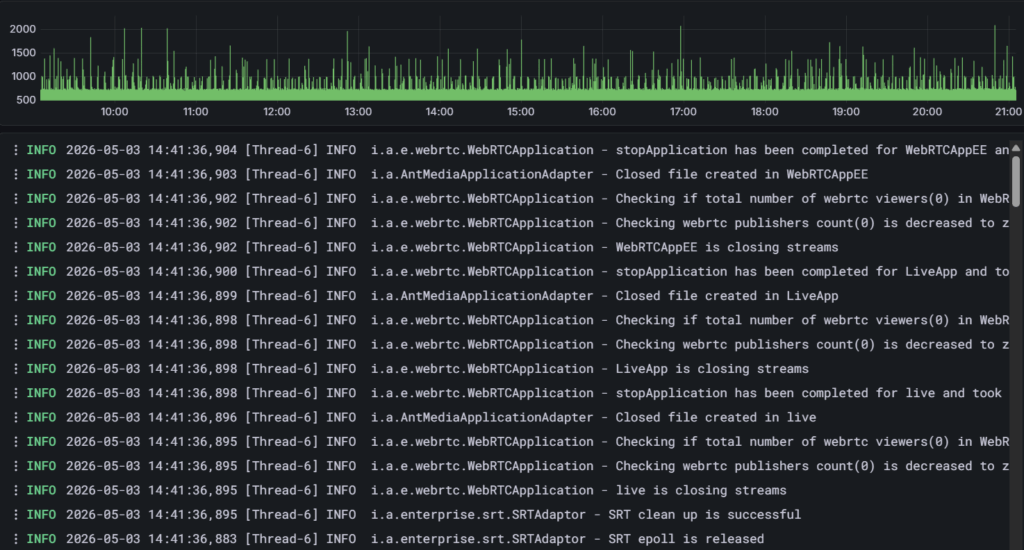
🎉 Centralized Logging for Media Servers is Active!
Here’s what the Ant Media team sees on their end once your centralized logging is flowing — a live, searchable stream of operational logs from your Ant Media Server deployment.
Frequently Asked Questions
Can I set up centralized logging for media servers myself, or does the Ant Media team have to do it?
Does centralized logging for media servers affect streaming performance?
What exactly is collected? Can the Ant Media team see my stream content?
Can I use this with a Kubernetes cluster that already has Fluent Bit deployed?
You now have centralized logging for media servers running, and the Ant Media team has full visibility into your deployment’s operational health.
Questions? Contact Ant Media support or visit the Ant Media GitHub Discussions.