
Google, Cisco, Akamai, and Cloudflare don’t often line up behind the same new protocol. They have for this one. It’s called Media over QUIC (MoQ), the IETF is standardizing it, and as of today, Ant Media Server runs it too.
MoQ is where the industry is betting live streaming goes next: sub-second latency and CDN-scale delivery in a single protocol, with no separate tradeoff between the two. Rather than wait years for the spec to fully land, we shipped early support so you can start building on it now. This post is a brief walkthrough of the MoQ protocol and how it integrates with AMS.
Table of Contents
- What Is MoQ?
- Introducing MoQ Support in Ant Media Server
- MoQ vs. WebRTC vs. LL-HLS
- moq-lite vs. Full IETF moq-transport: Where Things Stand
- How It Works: Architecture Overview
- Built-In Browser Player and Publisher
- Supported Codecs
- Getting Started
- Playing Streams via MoQ
- Publishing Streams into AMS via MoQ
- Configuration
- Frequently Asked Questions
- Conclusion
What Is MoQ?
Media over QUIC (MoQ) is an emerging live media protocol built on QUIC and WebTransport, currently being standardized by an active IETF working group.
At its core, MoQ is built on QUIC, a modern transport protocol that handles multiple streams of data independently over a single connection. That means a delayed frame doesn’t block the ones behind it. On top of QUIC, MoQ uses WebTransport to make this accessible directly from the browser, with no plugins or native apps required. The end result is latency in the range of WebRTC, with a delivery model that scales out through a CDN. Cloudflare is already running MoQ at their edge in alpha, so the CDN-scale part isn’t theoretical.
If you want a deeper technical comparison, read our article WebRTC vs. MoQ — Two Protocols, One Platform Completely Built for Both. In this post, we focus on the practical: how MoQ works in AMS and how to use it.
Introducing MoQ Support in Ant Media Server
The AMS MoQ plugin adds bidirectional MoQ support to any Ant Media Server deployment:
The plugin ships with an embedded moq lite relay, so there is no extra infrastructure to stand up for a first test. If you already have a moq-lite compatible relay running, whether self-hosted or a third-party service like Cloudflare’s MoQ CDN edge, you can point the plugin at that instead. A ready-to-use browser player and publisher page are also included out of the box.
MoQ vs. WebRTC vs. LL-HLS
| Feature | MoQ | WebRTC | LL-HLS |
|---|---|---|---|
| Origin | ~2022–present, IETF draft | 2011, W3C & IETF standard | 2019, RFC 8216bis + LL extensions |
| Latency | Sub-second (configurable) Flexible | ~0.2–0.5s Ultra-low | ~4+ seconds Low |
| Architecture | Pub/Sub + CDN relay | SFU | CDN / origin |
| CDN Cacheable | Yes | No | Yes |
| Browser Support | Chrome, Edge, Safari Growing | All major browsers Universal | All major browsers Universal |
| Transport | UDP / QUIC / WebTransport | UDP / DTLS-SRTP | HTTP |
moq-lite vs. Full IETF moq-transport: Where Things Stand
It is worth being precise about what “MoQ support” means today, because there are two distinct layers to understand.
How It Works: Architecture Overview
The plugin integrates at the muxer level inside AMS. When a broadcast starts, a MoQMuxer is attached to the stream’s mux pipeline: one for the source quality and one for each adaptive rendition. Encoded frames flow from the encoder directly into the muxer, which forwards them to the embedded relay for fan-out over WebTransport.
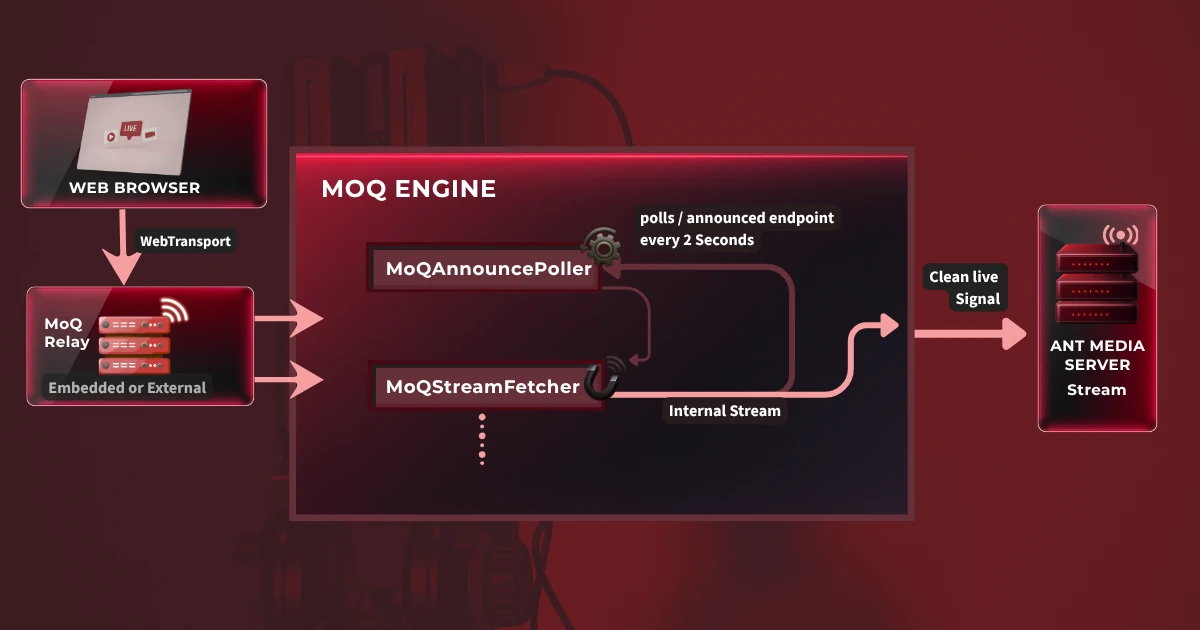
Ingest (Browser → AMS)
Egress (AMS → Browser)
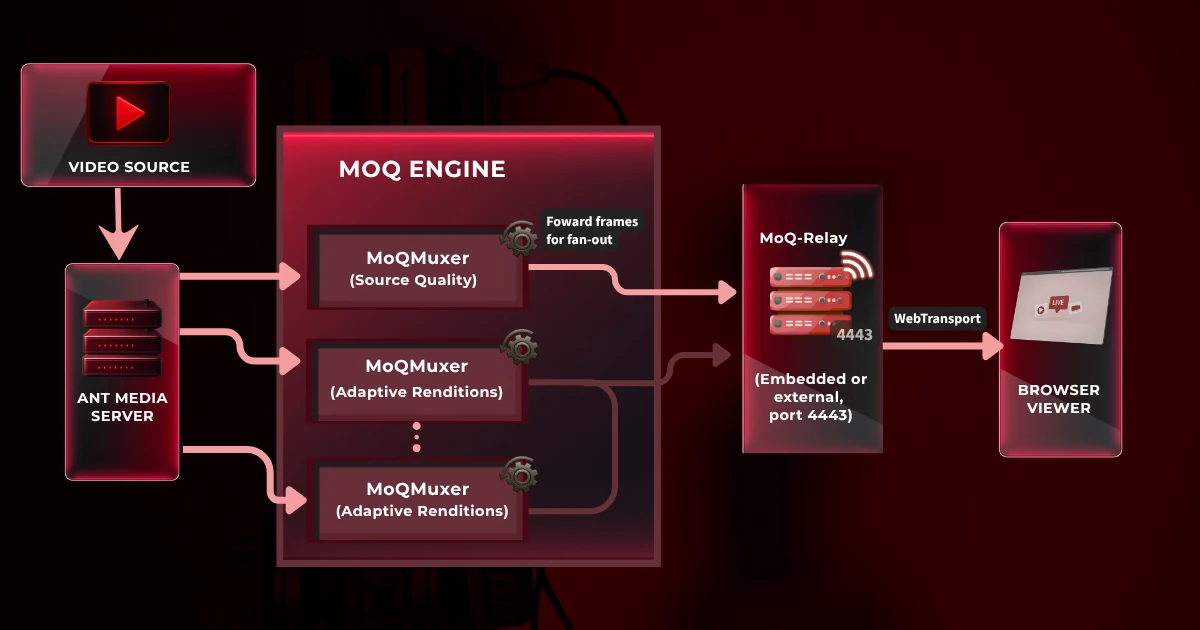
This architecture keeps AMS at the center. Whether you are sending video out to MoQ viewers or pulling video in from a MoQ source, the stream is fully integrated into the AMS ecosystem. The REST API, management console, recording, and all other AMS features apply as normal.
Built-In Browser Player and Publisher
The plugin ships two ready-to-use HTML pages built on the moq-lite TypeScript web components.
AMS MoQ Player
The player page (play.html) is built on the <moq-watch> web component and requires no JavaScript beyond what is bundled. Key capabilities:
AMS MoQ Publisher
The publisher page (publish.html) is built on the <moq-publish> web component and allows browser-based publishing directly to the MoQ relay:
Supported Codecs
| Track | Supported Codecs |
|---|---|
| Video | H.264 (AVC) H.265 (HEVC) |
| Audio | AAC Opus |
H.264 streams use Annex B SPS/PPS extraction to ensure correct decoder initialization on the receiver side. Codecs outside this list (such as VP8) are not yet supported. Expect this to expand as the MoQ ecosystem matures.
Getting Started
Requirements: Ant Media Server 3.0.0 or later, Linux x86_64, sudo access.
Download MoQPlugin-release.zip and upload it to your server, then run:
# 1. Unzip the release
unzip MoQPlugin-release.zip

# 2. Install the plugin and relay binaries
cd MoQ-Plugin
sudo chmod +x install-moq-plugin.sh
sudo ./install-moq-plugin.sh

# 3. Copy the MoQ player pages to your AMS application
sudo mkdir -p /usr/local/antmedia/webapps/live/moq
sudo cp -r moq-ams-player-build/* /usr/local/antmedia/webapps/live/moq

# 4. Restart AMS
sudo service antmedia restart
The install script copies MoQPlugin.jar to the plugins directory and extracts the relay binaries. After restart, both pages will be available on your server:
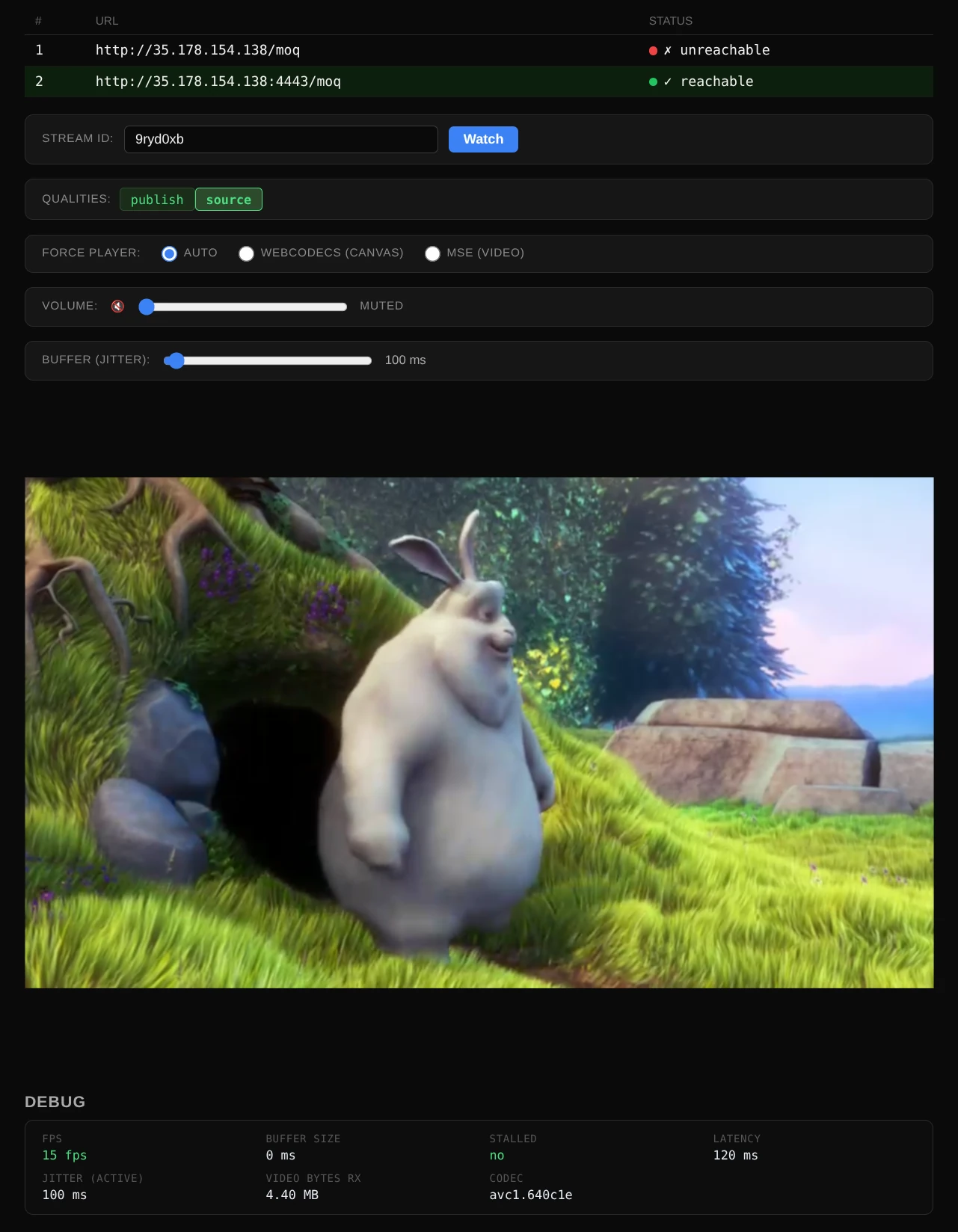
Once the server is running, open the publish and play pages in your browser, that’s all it takes!

- HTTPS required on real servers. MoQ uses WebTransport, and browsers only allow it over HTTPS. If your server is on a real domain or IP address, it needs a valid SSL certificate. Note that localhost is one of the exceptions where MoQ works without SSL.
- Open port 4443. The embedded MoQ relay listens on UDP/TCP port 4443. If your server is behind a firewall, make sure that port is open to inbound traffic or the browser won’t be able to reach the relay.
Playing Streams via MoQ
Once a stream is live on AMS, viewers can connect directly via the built-in MoQ player or any moq compatible client. Each quality level is available as a separate named track:
When the player opens, you will see a list of available tracks for the stream. The source track is the original quality as published into AMS. Named renditions like 720p or 480p are adaptive bitrate versions that AMS transcoded on the way through.
The browser player connects to the relay via WebTransport and subscribes to the preferred track. The relay handles all fan-out, so a single stream can support any number of concurrent viewers without the per-connection overhead that makes WebRTC challenging at scale.
Publishing Streams into AMS via MoQ
AMS also accepts incoming MoQ streams. Beyond the built-in browser publisher, any moq-compatible client can publish directly to the relay and AMS will pick it up as a regular broadcast. Two ways to do it:
publish.html from the plugin, enter your relay address, and start publishing from your camera or screen. No setup required.moq://relay-ip:4443/moq/streamId/publishOnce received, the stream becomes a standard AMS broadcast, ready for recording, transcoding, or re-distribution over WebRTC, HLS, or RTMP.
Configuration
Configuration is optional. The plugin works out of the box with the defaults shown below. To override any value, go to your application’s Settings > Advanced in the AMS web panel and add your MoQ settings nested inside customSettings, under the plugin.moq key:
{
  "customSettings": {
    "plugin.moq": {
      "useEmbeddedRelay":     true,
      "ingestEnabled":        true,
      "externalRelayUrl":     "https://relay.example.com:9000/moq",
      "ingestPollIntervalMs": 2000
    }
  }
}| Setting | Default | Description |
|---|---|---|
useEmbeddedRelay |
true |
Use the bundled moq-relay on port 4443. Set to false to use an external relay. |
ingestEnabled |
true |
Enable MoQ ingest via announce polling. Set to false if AMS is publish-only. |
externalRelayUrl |
localhost:4443 |
URL of the external relay. Only used when useEmbeddedRelay is false. |
ingestPollIntervalMs |
2000 |
How frequently (in ms) to poll the relay’s /announced endpoint for new streams. |
When useEmbeddedRelay is true, the relay URL resolves automatically to http://localhost:4443/moq and the external URL setting is ignored.
Frequently Asked Questions
Is the MoQ plugin ready for production use?
The plugin is functional and actively maintained. That said, MoQ as a protocol is still being standardized, so your production readiness depends on your tolerance for an evolving spec. If you are planning a serious integration, we recommend starting with a staging environment and reaching out to us to discuss your use case.
Which browsers support MoQ playback?
MoQ playback uses WebTransport, which is now supported across all major browsers: Chrome and Edge since v97 (2021), Firefox since v114 (2023), and Safari since 26.4 (2026). One thing to know about Safari: its WebTransport support is tied to the OS version, so MoQ playback in Safari needs macOS 26.4 or iOS 26.4 at minimum. For older browsers and devices, the player can fall back to a WebSocket transport. Playback still works, though latency and stability may vary compared to the WebTransport path.
Can I use my own external MoQ relay instead of the embedded one?
Yes. Set useEmbeddedRelay: false in the plugin configuration and provide your relay URL via externalRelayUrl. Any moq-compatible relay works, including self-hosted deployments or Cloudflare’s MoQ CDN offering.
Does MoQ replace WebRTC in Ant Media Server?
No, they serve complementary roles. WebRTC remains the right choice for interactive, two-way communication such as video conferencing or ultra-low-latency broadcast (under 200ms). MoQ targets one-to-many broadcast scenarios where you need both sub-second latency and CDN-scale delivery at the same time. Both protocols are supported by AMS and can run side by side on the same server. For a detailed breakdown, see our article WebRTC vs. MoQ — Two Protocols, One Platform Completely Built for Both.
What is moqtail.dev, and when will AMS support it?
moqtail.dev represents the next step in the MoQ ecosystem as the IETF standard matures. We are monitoring its development closely. Support will be added to the AMS MoQ plugin as the library stabilizes and it becomes practical to integrate.
Conclusion
The AMS MoQ plugin is an early but functional step toward the next generation of live streaming infrastructure. By building on moq-lite today, Ant Media Server gives developers a hands-on way to explore what MoQ brings to the table: sub-second latency, CDN-scale fan-out, and a modern browser stack built on WebTransport and WebCodecs. No need to wait for the IETF to wrap up the spec.
We will keep shipping updates as moq-lite evolves and as moqtail.dev support becomes practical to integrate. If you are experimenting with the MoQ plugin or building something on top of it, tell us about it on our community forum or reach out directly.