Building real-time video applications requires mastering the WebRTC Media Stream API – the technology powering everything from video conferencing to live streaming platforms. Whether you’re implementing a telehealth solution, creating an interactive education platform, or developing the next streaming innovation, understanding MediaStream fundamentals determines your application’s success.
This comprehensive guide reveals exactly how to capture, process, and transmit media streams with sub-second latency. You’ll discover practical implementation patterns, performance optimization techniques, and production-ready code examples that transform complex WebRTC concepts into working solutions.
Ant Media Server users particularly benefit from understanding MediaStream internals, as our platform extends these capabilities with ultra-low latency streaming (0.5 seconds), automatic scaling to thousands of viewers, and seamless protocol conversion between WebRTC, RTMP, & HLS.
What is the WebRTC Media Stream API?
The WebRTC Media Stream API provides JavaScript interfaces for capturing, processing, and streaming audio and video data directly from browsers and devices. A MediaStream represents a real-time flow of media content containing synchronized audio and video tracks. For the official specification, refer to the W3C MediaStream specification.
Learn more about implementing WebRTC with our JavaScript SDK integration guide.
How Does MediaStream Work in WebRTC Architecture?
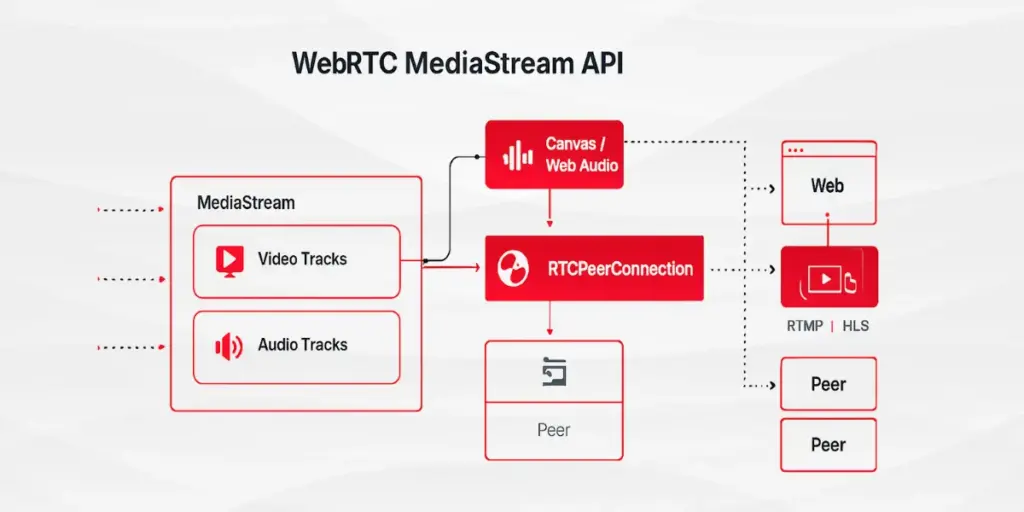
The MediaStream API consists of two core components: MediaStream and MediaStreamTrack interfaces. Each MediaStream acts as a container holding multiple MediaStreamTrack objects representing individual audio or video sources from cameras, microphones, or screen capture. For comprehensive details, see the MediaStream API documentation on MDN.
MediaStream objects maintain single input and output connections. The input originates from media sources like getUserMedia() for local devices, while the output connects to consumers including video elements, RTCPeerConnection for WebRTC playback, or Web Audio API nodes for processing.
What are the Core MediaStream Components?
MediaStream Object Properties
Every MediaStream contains a unique 36-character UUID identifier and an active property indicating whether the stream currently contains live media tracks. These properties enable developers to track stream states and manage multiple concurrent streams in applications like Ant Media Server’s multi-party video conferencing solutions.
MediaStreamTrack Fundamentals
Each MediaStreamTrack represents media of a single type originating from one source in the browser. For detailed API reference, see the MediaStreamTrack interface reference. Tracks contain channels representing the smallest media unit, such as left and right audio channels in stereo tracks. Understanding track architecture proves essential when implementing features like Ant Media Server’s adaptive bitrate configuration, where tracks require individual quality adjustments.
Which Methods Enable MediaStream Manipulation?
Track Management Methods
The MediaStream interface provides methods including addTrack() for storing track copies, removeTrack() for track removal, and clone() for creating independent stream copies with unique identifiers. These methods form the foundation for dynamic stream composition in real-time applications.
Track Retrieval Methods
Developers access tracks through getAudioTracks() and getVideoTracks() for type-specific retrieval, getTracks() for all tracks regardless of type, and getTrackById() for targeted track access using unique identifiers.
How to Implement getUserMedia() for Media Capture?
Basic Media Request Structure
For complete API details, consult the getUserMedia() API reference.
async function captureMedia() {

  try {

    const stream = await navigator.mediaDevices.getUserMedia({

      video: {

        width: { ideal: 1920 },

        height: { ideal: 1080 },

        frameRate: { ideal: 30 }

      },

      audio: {

        echoCancellation: true,

        noiseSuppression: true,

        autoGainControl: true

      }

    });

    return stream;

  } catch (error) {

    console.error('Media access denied:', error);

  }

}
MediaStreamConstraints define media requirements through flexible specifications. Browsers attempt matching ideal settings but fall back to supported alternatives when necessary.
After capturing media, learn how to publish WebRTC streams to Ant Media Server.
Permission Handling Requirements
The getUserMedia() call triggers browser permission requests. Acceptance resolves the promise with a MediaStream containing requested tracks. Denial throws PermissionDeniedError, while absence of matching devices triggers NotFoundError.
What Events Enable MediaStream State Tracking?
Track Addition and Removal Events
MediaStream dispatches addtrack events when new MediaStreamTrack objects join the stream and removetrack events during track removal. These events enable dynamic interface updates in applications using the Ant Media WebRTC SDK documentation.
Stream Activity Events
The active and inactive events signal stream state changes, though browser support varies. Production applications should implement fallback state tracking through track monitoring.
How to Process MediaStream for Advanced Features?
Canvas-Based Stream Manipulation
Explore Canvas API capabilities for advanced processing:
javascript
function processVideoStream(inputStream) {

  const video = document.createElement('video');

  video.srcObject = inputStream;

  video.play();

  const canvas = document.createElement('canvas');

  const ctx = canvas.getContext('2d');

  function drawFrame() {

    ctx.drawImage(video, 0, 0, canvas.width, canvas.height);

    // Apply custom processing here

    requestAnimationFrame(drawFrame);

  }

  drawFrame();

  return canvas.captureStream(30); // 30 FPS output

}
Web Audio API Integration
For audio processing, leverage Web Audio API processing:
function processAudioStream(inputStream) {

  const audioContext = new AudioContext();

  const source = audioContext.createMediaStreamSource(inputStream);

  const destination = audioContext.createMediaStreamDestination();

  // Add audio processing nodes

  const compressor = audioContext.createDynamicsCompressor();

  source.connect(compressor);

  compressor.connect(destination);

  return destination.stream;

}
Which Constraints Optimize Stream Quality?
Video Constraints for Production
const productionConstraints = {

  video: {

    width: { min: 1280, ideal: 1920, max: 3840 },

    height: { min: 720, ideal: 1080, max: 2160 },

    frameRate: { min: 24, ideal: 30, max: 60 },

    aspectRatio: { ideal: 16/9 },

    facingMode: 'user' // or 'environment' for mobile

  }

};
Audio Constraints for Clarity
const audioConstraints = {

  audio: {

    sampleRate: { ideal: 48000 },

    sampleSize: { ideal: 16 },

    channelCount: { ideal: 2 },

    echoCancellation: { exact: true },

    noiseSuppression: { exact: true },

    autoGainControl: { exact: false }

  }

};
How Does MediaStream Connect to RTCPeerConnection?
Adding Local Streams to Peer Connections
Media streams connect to RTCPeerConnection through the addTrack() method, which individually adds tracks for transmission to remote peers. Learn more from the RTCPeerConnection implementation guide and the RTCPeerConnection API documentation. Tracks can be added before connection establishment, enabling early setup optimization.
const pc = new RTCPeerConnection(configuration);

localStream.getTracks().forEach(track => {

  pc.addTrack(track, localStream);

});
Receiving Remote Streams
Remote track reception occurs through the track event listener on RTCPeerConnection. The event provides streams arrays containing the remote MediaStream objects.
pc.addEventListener('track', (event) => {

  const [remoteStream] = event.streams;

  videoElement.srcObject = remoteStream;

});
What Are MediaStream Best Practices for Production?
Resource Management Strategies
Track lifecycle management prevents memory leaks:
function cleanupStream(stream) {

  stream.getTracks().forEach(track => {

    track.stop();

  });

  stream = null;

}
Error Recovery Implementation
Robust applications implement comprehensive error handling:
async function reliableCapture(constraints, retries = 3) {

  for (let attempt = 0; attempt < retries; attempt++) {

    try {

      return await navigator.mediaDevices.getUserMedia(constraints);

    } catch (error) {

      if (error.name === 'NotAllowedError') throw error;

      await new Promise(resolve => setTimeout(resolve, 1000));

    }

  }

  throw new Error('Media capture failed after retries');

}
How to Debug MediaStream Issues?
Chrome DevTools WebRTC Internals
Chrome provides debugging through chrome://webrtc-internals/, displaying real-time statistics, connection states, and track information for active WebRTC sessions. For more debugging techniques, see the Chrome DevTools documentation.
Performance Monitoring
function monitorStreamStats(stream) {

  stream.getTracks().forEach(track => {

    console.log(`Track ${track.id}:`, {

      kind: track.kind,

      enabled: track.enabled,

      muted: track.muted,

      readyState: track.readyState,

      settings: track.getSettings()

    });

  });

}
For advanced performance optimization, check our guide to optimize WebRTC performance.
Which Browser Compatibility Considerations Matter?
Feature Detection Patterns
function checkMediaStreamSupport() {

  const support = {

    getUserMedia: !!(navigator.mediaDevices?.getUserMedia),

    getDisplayMedia: !!(navigator.mediaDevices?.getDisplayMedia),

    captureStream: !!HTMLCanvasElement.prototype.captureStream,

    mediaRecorder: typeof MediaRecorder !== 'undefined'

  };

  return support;

}
Polyfill Requirements
The adapter.js polyfill library provides shims for WebRTC incompatibilities across browsers, ensuring consistent behavior in production environments.
How Does Ant Media Server Extend MediaStream Capabilities?
Ant Media Server enhances native MediaStream functionality through:
Enterprise Edition ultra-low latency features: Server-side optimization reduces MediaStream transmission latency to 0.2-0.5 seconds, surpassing standard WebRTC implementations.
Scalable Stream Distribution: Single MediaStream sources reach thousands of viewers through Ant Media’s cluster configuration and scaling guide, eliminating peer-to-peer connection limits.
Protocol conversion capabilities: MediaStream content seamlessly converts between WebRTC, RTMP, HLS, and CMAF protocols, maximizing compatibility across platforms.
Adaptive bitrate streaming setup: Automatic quality adjustment based on network conditions ensures optimal MediaStream delivery without client-side complexity.
What Performance Optimizations Improve MediaStream?
Resolution Adaptation
async function adaptiveResolution(currentStream) {

  const connection = navigator.connection;

  const constraints = {

    video: {

      width: connection.effectiveType === '4g' ? 1920 : 1280,

      height: connection.effectiveType === '4g' ? 1080 : 720

    }

  };

  const newStream = await navigator.mediaDevices.getUserMedia(constraints);

  return newStream;

}
Frame Rate Optimization
Dynamic frame rate adjustment based on CPU usage:
function optimizeFrameRate(track) {

  const settings = track.getSettings();

  const capabilities = track.getCapabilities();

  track.applyConstraints({

    frameRate: {

      ideal: Math.min(30, capabilities.frameRate.max)

    }

  });

}
Security Considerations for MediaStream Implementation
HTTPS Requirement
MediaStream API access requires secure contexts (HTTPS), except for localhost development environments. Learn about SSL/TLS configuration for WebRTC.
Permission Persistence
Modern browsers remember permission decisions per origin. Applications should handle both granted and denied states gracefully:
async function checkPermissionState() {

  const result = await navigator.permissions.query({name: 'camera'});

  return result.state; // 'granted', 'denied', or 'prompt'

}
Frequently Asked Questions
What is the difference between MediaStream and MediaStreamTrack?
Can I use MediaStream API without HTTPS?
How many MediaStreamTracks can a single MediaStream contain?
Does MediaStream work on mobile browsers?
What causes getUserMedia() to fail?
Can MediaStream capture screen content?
What is the maximum resolution MediaStream supports?
Does MediaStream consume bandwidth without transmission?
Can multiple applications access the same camera simultaneously?
What is the latency of MediaStream capture?
What is the maximum duration for MediaStream recording?
What is MediaStream latency with Ant Media Server?
Conclusion
The WebRTC Media Stream API provides the foundation for real-time media applications. Understanding MediaStream and MediaStreamTrack interfaces, constraint systems, and event handling enables developers to build sophisticated streaming solutions. When combined with platforms like Ant Media Server, these APIs deliver production-ready streaming with ultra-low latency, scalability, and cross-platform compatibility.Ready to implement WebRTC in your application? Start your free trial of Ant Media Server today.
Estimate Your Streaming Costs
Use our free Cost Calculator to find out how much you can save with Ant Media Server based on your usage.
Open Cost Calculator