
RTSP — Real-Time Streaming Protocol — is a network control protocol designed to establish and manage media sessions between endpoints. Standardized by the IETF as RFC 2326 in 1998, RTSP operates at the application layer and acts as a “network remote control” for multimedia servers: it controls stream delivery without transporting the media data itself.
RTSP remains one of the most widely used protocols for IP camera streaming and continues to be the standard in surveillance, CCTV, and NVR/DVR architectures. Understanding how RTSP works, which port it uses, and how it compares to WebRTC and HLS helps you choose the right protocol for your streaming infrastructure.
Table of Contents
What Does RTSP Stand For?
RTSP stands for Real-Time Streaming Protocol. The acronym breaks down as: RT = Real-Time, S = Streaming, P = Protocol. RTSP was developed jointly by RealNetworks, Netscape, and Columbia University between 1996 and 1997 and formalized in RFC 2326 by the IETF in 1998. A second version, RTSP 2.0, was published as RFC 7826 in 2016.
What is RTSP?
RTSP is a stateful application-layer protocol that establishes and controls one or several time-synchronized streams of continuous media — audio, video, or both. It does not transport the media data itself; instead, it issues commands (play, pause, teardown) to a media server that then delivers the actual content via RTP (Real-Time Transport Protocol).
The IETF definition from RFC 2326 describes RTSP as: “a network remote control for multimedia servers.” When a user starts a video stream from an IP camera, the client device sends RTSP requests to the media server. Once the session is set up, the server delivers audio and video data over RTP while RTSP continues managing the session state.
RTSP was once a leading internet streaming protocol for both audio and video. HTTP-based adaptive bitrate streaming — HLS, DASH, and CMAF — eventually displaced RTSP for browser-based delivery. Today RTSP’s primary role is first-mile ingest: IP cameras, NVRs, DVRs, and surveillance systems output RTSP streams that a media server receives, transcodes, and re-publishes in browser-compatible formats.
What are the RTSP Technical Specifications?
The table below lists the core technical specifications of RTSP across 8 dimensions relevant to streaming infrastructure decisions.
| Specification | RTSP Details |
|---|---|
| Standard | RFC 2326 (1998), RFC 7826 — RTSP 2.0 (2016) |
| Default Port | 554 (TCP/UDP) |
| Transport Layer | TCP (control), RTP over UDP or TCP (media) |
| Latency | ~1–2 seconds (network-dependent) |
| Video Codecs | H.265 (preview), H.264, VP9, VP8 |
| Audio Codecs | AAC, AAC-LC, HE-AAC+ v1 & v2, MP3, Speex, Opus, Vorbis |
| Encryption | RTSPS over TLS (port 322); native RTSP has no built-in encryption |
| Primary Use Case | IP camera ingest, surveillance, NVR/DVR, first-mile delivery |
The most important row is transport: RTSP uses TCP for its control channel but delivers media frames over RTP, which defaults to UDP. This separation is why RTSP achieves low latency for surveillance but struggles with scalable browser playback — UDP delivery and lack of native encryption are incompatible with modern browser security models.
What Port Does RTSP Use?
RTSP uses port 554 by default for both TCP and UDP connections. Port 554 is the IANA-assigned standard port for RTSP. RTSPS — RTSP over TLS for encrypted transport — uses port 322 by default. The RTP data streams that carry the actual media are assigned dynamically on even-numbered UDP ports (typically in the range 6970–9999), with RTCP using the adjacent odd-numbered port.
For firewall configuration when deploying an RTSP streaming server, the following ports require access: port 554 (RTSP control), port 322 (RTSPS), and the dynamic UDP port range used by RTP. Many enterprise networks block UDP traffic, which forces RTSP to tunnel RTP over TCP — increasing latency but maintaining connectivity through restrictive network environments.
How Does RTSP Work?
RTSP works by separating session control from media transport: the RTSP layer handles signaling (play, pause, stop) while RTP handles the actual frame delivery. Here is the sequence of events in an RTSP streaming session.
- OPTIONS request: The client queries the server to discover supported methods.
- DESCRIBE request: The client requests the SDP (Session Description Protocol) file that describes the media stream’s codecs, bitrate, and transport parameters.
- SETUP request: The client specifies transport parameters — UDP or TCP, client port range for RTP/RTCP.
- PLAY request: The server begins delivering RTP packets containing encoded video and audio frames.
- PAUSE / TEARDOWN: The client halts or terminates the session; the server stops RTP delivery.
RTSP maintains a persistent TCP connection for this control channel throughout the session. The protocol resembles HTTP in syntax — requests use methods, headers, and status codes — but RTSP is stateful while HTTP is stateless. RTSP does not support content encryption natively and does not retransmit lost RTP packets, which contributes to its limitations in unreliable network conditions.
What Transport Protocol Does RTSP Use?
RTSP uses TCP for its control channel and relies on RTP (Real-Time Transport Protocol) over UDP for media delivery. The full protocol stack in a standard RTSP deployment consists of three components working together.
- RTSP — application-layer session control; runs over TCP port 554
- RTP (Real-Time Transport Protocol) — carries encoded audio/video frames; runs over UDP (dynamic ports)
- RTCP (Real-Time Control Protocol) — monitors RTP delivery quality (packet loss, jitter, round-trip delay); runs over the UDP port adjacent to the RTP port
When UDP is blocked by a firewall, RTSP can interleave RTP and RTCP data inside the TCP control connection — a mode called “RTSP interleaved binary data.” This preserves connectivity at the cost of higher latency because TCP’s retransmission mechanism introduces jitter. The entire RTSP/RTP/RTCP stack is commonly referred to simply as “RTSP” in product documentation and camera configuration interfaces.
What are the RTSP Requests?
RTSP defines 9 standard methods that clients send to the server to control media sessions. Each method maps to a specific phase of the streaming lifecycle.
- OPTIONS — queries which methods the server supports; always the first request in a session
- DESCRIBE — retrieves the SDP file describing stream codecs, bitrate, and transport parameters
- ANNOUNCE — describes the presentation when sent from client to server; updates description when sent from server to client
- SETUP — specifies transport parameters (UDP/TCP, port range) before play begins
- PLAY — instructs the server to begin RTP data delivery
- PAUSE — halts RTP delivery without terminating the session
- RECORD — initiates server-side recording of the media stream
- TEARDOWN — terminates the session and stops all associated RTP streams
- REDIRECT — instructs the client to reconnect to a different server URL
Additional methods include GET_PARAMETER, SET_PARAMETER, and EMBEDDED (interleaved binary data for TCP tunneling). The OPTIONS-DESCRIBE-SETUP-PLAY sequence is mandatory for every RTSP session; the remaining methods are optional depending on the use case.
RTSP vs RTMP: What Are the Differences?

RTSP and RTMP (Real-Time Messaging Protocol) are both first-mile ingest protocols, but they differ in origin, transport mechanism, and current ecosystem support. The table below compares 8 critical dimensions.
| Dimension | RTSP | RTMP |
|---|---|---|
| Developed by | RealNetworks + Netscape + Columbia University (1996–97) | Macromedia / Adobe (mid-2000s) |
| Standard | IETF RFC 2326 / RFC 7826 | Proprietary (Adobe); open spec published 2012 |
| Transport | TCP (control) + RTP/UDP (media) | TCP only |
| Default Port | 554 | 1935 |
| Latency | ~1–2 seconds | ~2–5 seconds |
| Primary Use | IP camera ingest, CCTV, NVR | Encoder-to-server ingest (OBS, Wirecast, vMix) |
| Browser Playback | Not supported natively | Not supported (Flash is dead) |
| Encryption | RTSPS over TLS | RTMPS over TLS |
The key operational difference is use case: RTSP is the native output protocol of IP cameras and NVRs, while RTMP is the native output of encoder software like OBS Studio. Both protocols serve exclusively as ingest mechanisms — neither can deliver video directly to a browser. A media server receives both RTSP and RTMP streams, then transcodes and re-distributes them in browser-compatible formats (WebRTC, HLS, or DASH).
RTSP vs WebRTC: What Are the Differences?

WebRTC is a browser-native real-time communication standard that achieves sub-500ms latency, making it fundamentally different from RTSP in scope and capability. RTSP is a session control protocol for managed server-client ingest; WebRTC is a peer-to-peer communication framework built into every modern browser.
| Dimension | RTSP | WebRTC |
|---|---|---|
| Latency | ~1–2 seconds | <500ms (sub-half-second) |
| Browser Support | None (requires plugin or transcoding) | Native — Chrome, Firefox, Safari, Edge, Opera |
| Encryption | Optional (RTSPS) | Mandatory — DTLS-SRTP for all streams |
| Architecture | Client-server (unicast) | Peer-to-peer or SFU/MCU server-mediated |
| Primary Use | IP camera ingest, surveillance | Video conferencing, interactive streaming, real-time apps |
| Scalability | Limited — single server unicast | Scales via SFU to thousands with Ant Media Server |
| Codec Support | H.264, H.265, VP8, VP9 | VP8, VP9, H.264, AV1 (browser-dependent) |
RTSP and WebRTC are complementary rather than competing. A common architecture pairs them directly: an IP camera outputs an RTSP stream, Ant Media Server ingests it, transcodes the content, and re-publishes it as a WebRTC video stream for sub-500ms browser playback. This RTSP-to-WebRTC conversion eliminates the browser compatibility gap while preserving the low-latency ingest from IP cameras.
RTSP vs HLS: What Are the Differences?
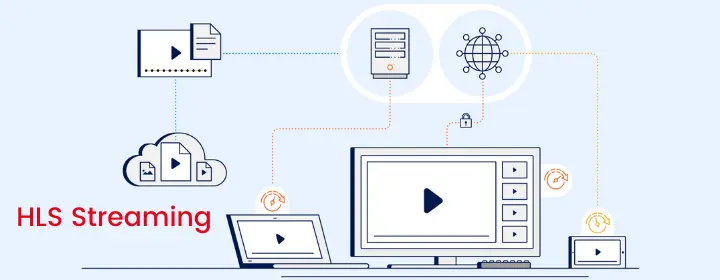
HLS (HTTP Live Streaming), created by Apple in 2009, is an adaptive bitrate delivery protocol that operates over standard HTTP infrastructure — CDNs, load balancers, and web servers. RTSP is a session control protocol that requires a dedicated media server and direct TCP connections. Their use cases do not overlap.
| Dimension | RTSP | HLS |
|---|---|---|
| Transport | TCP + RTP/UDP | HTTP/HTTPS |
| Latency | ~1–2 seconds | 5–20 seconds (LL-HLS: sub-2 seconds) |
| Browser Playback | Not supported | Universal — all major browsers and devices |
| Adaptive Bitrate | No | Yes — multiple quality renditions per stream |
| CDN Compatible | No | Yes — works with CloudFront, Akamai, Fastly |
| Scalability | Hundreds of viewers max | Millions of viewers via CDN |
| Primary Use | Camera ingest, surveillance | VOD delivery, broadcast, large-scale live streaming |
HLS is the dominant protocol for last-mile delivery to viewers; RTSP is the dominant protocol for first-mile ingest from cameras. They operate at opposite ends of the streaming pipeline. A production streaming architecture typically uses RTSP for camera ingest, a media server for transcoding, and HLS (or Low-Latency HLS) for viewer delivery.
RTSP vs CMAF: What Are the Differences?

CMAF (Common Media Application Format) is an ISO/IEC 23000-19 standard that unifies HLS and MPEG-DASH into a single container format, reducing encoding, storage, and delivery costs. RTSP and CMAF solve different problems: RTSP controls ingest sessions, CMAF standardizes delivery packaging.
Before CMAF, broadcasters had to encode and store separate file packages for HLS (.ts segments) and MPEG-DASH (.mp4 segments) — doubling storage costs and CDN cache competition. CMAF eliminates this by using fMP4 (fragmented MP4) containers compatible with both HLS and DASH players. Latency with CMAF delivery targets 3–5 seconds, with chunked CMAF achieving sub-3 seconds in optimized deployments.
RTSP is irrelevant at the delivery layer where CMAF operates. An RTSP stream from a camera feeds into a media server, which can then package and deliver output as CMAF for cross-platform compatibility — the two protocols operate at different pipeline stages.
How Does RTSP Work with IP Cameras?

RTSP is the native output protocol of virtually all IP cameras, NVRs, and DVRs — it is included on almost every IP camera on the market. IP cameras stream to a media server using the RTSP URL format: rtsp://[username]:[password]@[camera-ip]:554/[stream-path]. The media server establishes an RTSP session with the camera and pulls the RTP stream continuously.
IP cameras do not require a separate encoder — RTSP is the built-in transmission mechanism. This makes RTSP the standard for surveillance, CCTV, fixed-location broadcasting, and remote monitoring use cases. The limitation is that RTSP streams cannot be delivered directly to browsers; they require a media server to transcode and re-publish the content in browser-compatible formats. Ant Media Server handles IP camera streaming via RTSP pull, converting ingest to WebRTC, HLS, or DASH for viewer delivery.
RTSP Streaming with Ant Media Server
Ant Media Server supports RTSP as both an ingest and output protocol. On the ingest side, Ant Media Server pulls RTSP streams from IP cameras, NVRs, and any RTSP-compatible source. On the output side, it can deliver streams as RTSP output alongside WebRTC, HLS, DASH, and CMAF — making it one of the few media servers covering the full protocol stack for streaming infrastructure.
Key RTSP capabilities in Ant Media Server include RTSP stream pulling from IP cameras, RTSP output for downstream RTSP-compatible systems, protocol transcoding from RTSP ingest to WebRTC or HLS delivery, and support for H.264 and H.265 codec passthrough from RTSP sources. Ant Media Server deploys on AWS, Azure, GCP, Alibaba Cloud, and on-premises Linux environments.
How to Set Up a Free RTSP Server in 7 Steps
Ant Media Server Community Edition is free, open-source, and self-hosted. It includes RTSP ingest support, HLS playback, MP4 recording, and IP camera integration. The Enterprise Edition adds sub-500ms WebRTC delivery, adaptive bitrate streaming, clustering, and hardware encoding for production deployments.
Community Edition vs Enterprise Edition: Which Do You Need?
| Feature | Community Edition (Free) | Enterprise Edition |
|---|---|---|
| RTSP Ingest | Yes | Yes |
| HLS Playback | Yes (8–12s latency) | Yes + LL-HLS (sub-2s) |
| WebRTC Delivery | No | Yes (sub-500ms) |
| Adaptive Bitrate | No | Yes |
| Clustering / Scaling | No | Yes |
| Hardware Encoding | No | Yes (CUDA, QuickSync) |
| Android / iOS SDKs | No | Yes |
| Support | Community | Direct from Ant Media |
Community Edition covers surveillance monitoring and basic IP camera streaming scenarios. Enterprise Edition is required for real-time WebRTC delivery, scalable concurrent viewer loads, and adaptive bitrate transcoding across RTSP ingest sources.
1. Download Ant Media Server
Download the Ant Media Server installer to your Linux server.
- Community Edition: download from GitHub releases
- Enterprise Edition: available in your account after license activation at antmedia.io
2. Open Terminal and Navigate to the Directory
cd /home/ubuntu3. Download the Installation Script
wget https://raw.githubusercontent.com/ant-media/Scripts/master/install_ant-media-server.sh && chmod 755 install_ant-media-server.sh4. Run the Installation Script
Enterprise Edition — add your license key with the -l parameter:
sudo ./install_ant-media-server.sh -l 'your-license-key'Community Edition — run without parameters to install the latest version automatically:
sudo ./install_ant-media-server.sh5. Control the Service
sudo service antmedia status
sudo service antmedia stop
sudo service antmedia start
6. Install SSL for Your RTSP Server
Skip this step for localhost installations. For public deployments, assign a domain to your server’s public IP, navigate to the Ant Media installation directory, and run the SSL script:
cd /usr/local/antmedia
sudo ./enable_ssl.sh -d {DOMAIN_NAME}
7. Access the Web Panel
Open your browser and navigate to http://SERVER_IP_ADDRESS:5080. If the panel is inaccessible, verify that port 5080 is open in your firewall rules. The RTSP server is now running and ready to receive streams from IP cameras on port 554.
To validate RTSP ingest and WebRTC playback under realistic RTSP-to-WebRTC transcoding conditions — including concurrent camera connections, protocol conversion latency, and RTSP stream stability — test the 14-day RTSP server trial with your own IP camera sources before committing to a production deployment architecture.
Frequently Asked Questions
What does RTSP stand for?
RTSP stands for Real-Time Streaming Protocol. It is an IETF-standardized application-layer protocol (RFC 2326, 1998) that controls multimedia streaming sessions between a client and a media server. RTSP issues commands like play, pause, and teardown; actual media delivery uses RTP (Real-Time Transport Protocol).
What port does RTSP use?
RTSP uses port 554 by default for both TCP and UDP connections. RTSPS (RTSP over TLS) uses port 322. RTP media streams are delivered on dynamically assigned even-numbered UDP ports, typically in the 6970–9999 range, with RTCP on the adjacent odd port.
Is RTSP still used?
Yes. RTSP is the dominant ingest protocol for IP cameras, NVRs, and DVRs and remains the standard in surveillance and CCTV architectures. It is no longer used for browser-based playback delivery — HTTP-based protocols (HLS, DASH, WebRTC) have replaced it at the delivery layer.
Do all IP cameras support RTSP?
RTSP is included on virtually all IP cameras, NVRs, and DVRs. Most IP cameras expose an RTSP URL in the format rtsp://[user]:[password]@[camera-ip]:554/[stream-path]. Exact URL format varies by manufacturer — check your camera’s documentation for the specific stream path.
What is the difference between RTSP and RTMP?
RTSP is a session control protocol designed for IP camera ingest using TCP + RTP/UDP, running on port 554. RTMP is an encoder-to-server ingest protocol designed for OBS and encoder software, running on port 1935 over TCP. Neither supports browser playback — both serve as first-mile ingest protocols that feed a media server.
How do I set up a free RTSP server?
Install Ant Media Server Community Edition on a Linux machine using a single-command installation script from the Ant Media GitHub repository. The Community Edition is free, supports RTSP ingest on port 554, IP camera pulling, HLS playback, and MP4 recording. Installation takes under 10 minutes on a standard Ubuntu server.
What transport protocol does RTSP use?
RTSP uses TCP for its session control channel (port 554). Media delivery uses RTP (Real-Time Transport Protocol) over UDP. When UDP is blocked by firewalls, RTP can be tunneled inside the RTSP TCP connection as interleaved binary data. RTCP (Real-Time Control Protocol) monitors delivery quality on the adjacent UDP port.
Can RTSP streams play in a browser?
No. RTSP streams do not play natively in any browser. To display RTSP camera feeds in a browser, a media server must receive the RTSP stream and convert it to a browser-compatible format — WebRTC for sub-500ms latency, or HLS for broader compatibility with higher latency.
Conclusion
RTSP — standardized as RFC 2326 in 1998 — operates on port 554, uses TCP for session control and RTP/UDP for media delivery, and remains the dominant ingest protocol for IP cameras, NVRs, and DVRs across surveillance and CCTV architectures. RTSP does not compete with WebRTC, HLS, or CMAF; it occupies the first-mile ingest role while those protocols handle browser-based delivery at different latency tiers: WebRTC at sub-500ms, LL-HLS at sub-2 seconds, and standard HLS at 5–20 seconds.
The correct deployment pattern is RTSP ingest → media server transcoding → WebRTC or HLS delivery to viewers. Ant Media Server handles this full pipeline — pulling RTSP streams from cameras on port 554, converting to WebRTC for real-time browser playback, and scaling to concurrent viewer loads that single RTSP unicast connections cannot support. Validate the complete RTSP-to-WebRTC transcoding pipeline against your own IP camera sources with a 14-day free trial of Ant Media Server.