
GStreamer is a pipeline-based multimedia framework that enables developers to stream audio and video using professional protocols including RTMP, HLS, DASH/CMAF, and SRT. Combined with Ant Media Server, it provides a complete pipeline from source to viewer — supporting ingest and egress across all major streaming protocols.
This guide covers 5 essential GStreamer pipeline commands for sending and receiving live streams with Ant Media Server. Each pipeline is production-ready and can be adapted for real video files or test sources.
Table of Contents
What Streaming Protocols Does Ant Media Server Support?
Which Protocols Are Supported for Ingesting?
Ant Media Server supports push ingest over RTMP/RTMPS, WebRTC, SRT, and WHIP. It also supports RTSP as a pull-based source (the server fetches the stream from an IP camera or encoder). GStreamer supports RTMP and SRT push ingest directly via pipeline commands, making it the preferred tool for server-side or automated stream publishing.
Which Protocols Are Supported for Egressing?
Ant Media Server delivers streams over WebRTC (~0.5 second latency), HLS and LL-HLS, DASH/CMAF, and RTMP output for social media simulcasting. GStreamer consumes HLS and DASH egress directly using the souphttpsrc element.
What is GStreamer?
GStreamer is a pipeline-based multimedia framework that links together media processing plugins to form complex workflows. It is not a media player, codec converter, or file streaming service — but it can build all of them.
GStreamer is widely used in embedded systems, broadcast workflows, and automated testing environments. For WebRTC streaming use cases, browser-based tools or dedicated SDKs are preferred since GStreamer does not natively handle WebRTC ingest or egress without wrappers.
What are the Key Features of GStreamer?
GStreamer runs on all major operating systems and processor architectures. Its plugin architecture makes it modular — each plugin handles a specific task.
- Runs on Linux, Windows, macOS, Android, iOS, and most BSDs
- Supports x86, ARM, MIPS, SPARC, and PowerPC on 32-bit and 64-bit
- Multi-threaded pipelines are transparent to construct
- Pipelines can be visualized by exporting .dot files to PNG diagrams
- Resource-efficient plugin design avoids unnecessary memory usage
- Python, C, Rust, and other language bindings available
How Does GStreamer Work?
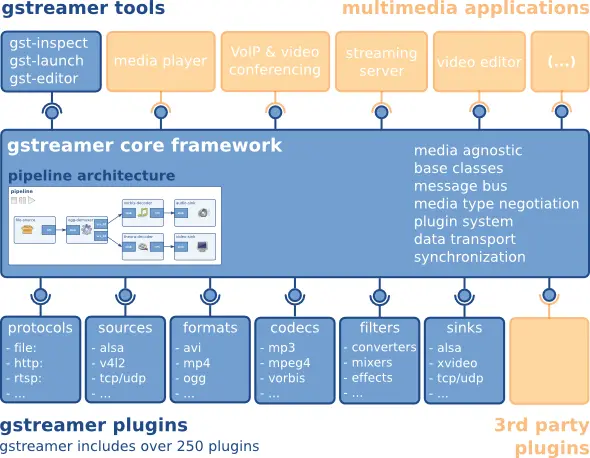
GStreamer uses a plugin architecture where each element handles a single task. Plugins are linked into a pipeline and data flows left-to-right. The ! operator connects elements. Common element categories include:
- Sources:
udpsrc,filesrc,videotestsrc,audiotestsrc - Codecs/Encoders:
x264enc,mpegtsmux,flvmux - Protocols:
rtmpsink,srtsink,souphttpsrc - Sinks:
autovideosink,autoaudiosink,filesink - Filters:
videoconvert,videoscale,decodebin
For a complete element reference, visit the official GStreamer documentation.
What are GStreamer Pipelines and How Do You Build Them?
A GStreamer pipeline is a sequence of connected elements. The gst-launch-1.0 command-line tool lets you build and test pipelines without writing code. Think of it as a water pipeline — data flows from source through processing stages to the sink.
Simple Test Pipelines
Display a test video pattern:
gst-launch-1.0 videotestsrc pattern=1 ! autovideosinkPlay a test audio tone at reduced volume:
gst-launch-1.0 audiotestsrc ! volume volume=0.1 ! autoaudiosinkHow Do You Install GStreamer?
Ubuntu / Debian
Run the following command to install GStreamer and all required plugins:
apt-get install libgstreamer1.0-dev libgstreamer-plugins-base1.0-dev libgstreamer-plugins-bad1.0-dev gstreamer1.0-plugins-base gstreamer1.0-plugins-good gstreamer1.0-plugins-bad gstreamer1.0-plugins-ugly gstreamer1.0-libav gstreamer1.0-tools gstreamer1.0-x gstreamer1.0-alsa gstreamer1.0-gl gstreamer1.0-gtk3 gstreamer1.0-qt5 gstreamer1.0-pulseaudioWindows
Download the Windows installer from the GStreamer download page.
macOS
Download the macOS package from the GStreamer download page.
How Do You Stream to and from Ant Media Server Using GStreamer?
Before running any pipeline, verify the following: (1) your Ant Media Server instance is running, (2) you have the correct server IP and application name, and (3) the stream ID is unique. You can monitor active streams in the Ant Media Server web panel. For ingesting pipelines, replace {AntMedia_IP}, {APP_NAME}, and {StreamId} with your actual values.
How Do You Send an RTMP Stream from GStreamer to Ant Media Server?
RTMP (Real-Time Messaging Protocol) is a TCP-based ingest protocol developed by Macromedia. It remains the most widely supported ingest format for live streaming encoders and broadcast tools. Ant Media Server supports RTMP ingest on port 1935.
Send a test video pattern via RTMP:
gst-launch-1.0 -v videotestsrc ! x264enc tune=zerolatency ! flvmux ! rtmpsink location="rtmp://{AntMedia_IP}/{APP_NAME}?streamid={APP_NAME}/{StreamId} live=1"Send an MP4 file via RTMP:
gst-launch-1.0 filesrc location=test.mp4 ! qtdemux ! decodebin ! x264enc tune=zerolatency ! flvmux ! rtmpsink location="rtmp://{AntMedia_IP}/{APP_NAME}?streamid={APP_NAME}/{StreamId} live=1"GStreamer rtmpsink Element: Key Properties
The rtmpsink element sends a multiplexed FLV stream over an RTMP connection. The table below lists the 3 most commonly configured rtmpsink properties.
| Property | Default | Description |
|---|---|---|
location |
(required) | Full RTMP URL including streamid parameter |
async |
true | Enable async pipeline state changes |
sync |
false | Sync to pipeline clock — set false for live ingest |
The location format for Ant Media Server is: rtmp://{IP}/{APP}?streamid={APP}/{StreamId} live=1. The live=1 flag disables buffer accumulation for real-time ingest.
How Do You Send an SRT Stream from GStreamer to Ant Media Server?
SRT (Secure Reliable Transport) is an open-source protocol optimized for reliable, low-latency delivery over unpredictable public networks. It operates over UDP and is ideal for contribution feeds and remote production. Ant Media Server accepts SRT ingest on port 4200.
Send a test video pattern via SRT:
gst-launch-1.0 videotestsrc ! x264enc tune=zerolatency ! mpegtsmux ! srtsink uri="srt://{AntMedia_IP}:4200?streamid={APP_NAME}/{StreamId}"Send an MP4 file via SRT:
gst-launch-1.0 filesrc location=test.mp4 ! qtdemux ! decodebin ! x264enc tune=zerolatency ! mpegtsmux ! srtsink uri=srt://{AntMedia_IP}:4200?streamid={APP_NAME}/{StreamId}To learn more about ingesting SRT and playing it back over WebRTC, see the guide on how to ingest SRT and play with WebRTC.
GStreamer srtsink Element: Key Properties
The srtsink element transmits an MPEG-TS stream over an SRT connection. The 4 properties below cover the minimum configuration required for Ant Media Server ingest.
| Property | Default | Description |
|---|---|---|
uri |
(required) | SRT URI — srt://{IP}:{port}?streamid={APP}/{StreamId} |
latency |
125 | SRT latency in milliseconds — increase for lossy networks |
mode |
caller | caller = push mode; listener = server pull mode |
passphrase |
(empty) | AES-128/256 encryption passphrase (optional) |
For low-latency GStreamer streaming over SRT, set latency to 200ms on unstable networks and 80ms on LAN connections. The streamid format must match exactly: {APP_NAME}/{StreamId}.
How Do You Publish Low-Latency HLS with hlssink2 in GStreamer?
The hlssink2 element writes HLS segments and a manifest (.m3u8) file locally from a GStreamer pipeline. Combined with LL-HLS support in Ant Media Server (available as a paid plugin), this enables sub-4-second end-to-end delivery. The low-latency property on hlssink2 enables CMAF chunked transfer for LL-HLS compatibility.
Publish HLS segments locally with hlssink2 (low-latency mode):
gst-launch-1.0 videotestsrc ! x264enc tune=zerolatency ! mpegtsmux ! hlssink2 location=/tmp/segments/segment%05d.ts playlist-location=/tmp/hls/stream.m3u8 target-duration=2 max-files=5 low-latency=trueKey hlssink2 properties for low-latency streaming:
target-duration: segment length in seconds — use 2 for low latencylow-latency: true enables partial segments for LL-HLSmax-files: limits the number of segments retained on diskplaylist-location: path to the output .m3u8 manifest file
How Do You Receive an HLS Stream from Ant Media Server in GStreamer?
HLS (HTTP Live Streaming) is Apple’s adaptive streaming protocol delivered over standard HTTP. Ant Media Server generates HLS manifests (.m3u8) and segments automatically once a stream is published. Low-latency HLS (LL-HLS) is also available as a paid plugin, reducing delivery lag to 2–4 seconds when installed and configured with ABR enabled.
gst-launch-1.0 souphttpsrc location="http://{AntMedia_IP}:5080/{APP_NAME}/streams/{StreamId}.m3u8?token=undefined&subscriberId=undefined&subscriberCode=undefined" ! hlsdemux ! decodebin ! videoconvert ! videoscale ! autovideosinkHow Do You Receive a DASH/CMAF Stream from Ant Media Server in GStreamer?
DASH (Dynamic Adaptive Streaming over HTTP) breaks video into segments encoded at multiple quality levels, enabling adaptive bitrate playback. Ant Media Server supports DASH with CMAF packaging, which is compatible with both DASH and HLS players.
gst-launch-1.0 souphttpsrc location="http://{AntMedia_IP}:5080/{APP_NAME}/streams/{StreamId}/{StreamId}.mpd?token=undefined&subscriberId=undefined&subscriberCode=undefined" ! dashdemux ! decodebin ! videoconvert ! videoscale ! autovideosinkGStreamer Protocol Comparison: Which Pipeline Should You Use?
The table below covers the 4 protocols supported in these GStreamer pipelines, comparing direction, latency, port, and primary use case.
| Protocol | Direction | Latency | Port | Use Case |
|---|---|---|---|---|
| RTMP | Ingest only | Encoder-dependent | 1935 | Encoder publishing, OBS, vMix |
| SRT | Ingest only | < 2 seconds | 4200 | Remote contribution, unstable networks |
| HLS | Egress only | 6–10 seconds (LL-HLS: 2–4s*) | 5080 | VOD-style playback, CDN delivery |
| DASH/CMAF | Egress only | 6–10 seconds | 5080 | Adaptive bitrate, multi-device playback |
For ~0.5-second delivery, WebRTC streaming is required. GStreamer does not natively support WebRTC without additional wrappers.
*LL-HLS requires the paid LL-HLS plugin for Ant Media Server and ABR must be enabled. See the LL-HLS product page for details.
What Can You Test with a 14-Day Free Trial?
All five pipeline configurations in this guide work with a self-hosted Ant Media Server instance. To validate RTMP ingest latency, SRT contribution reliability, and adaptive HLS egress in your specific network environment, start your 14-day free trial of Ant Media Server — no credit card required.
Frequently Asked Questions
Can I stream audio-only with GStreamer?
Audio-only GStreamer streams use audiotestsrc or any audio capture element, combined with the appropriate encoder and sink.
Does GStreamer natively support WebRTC ingest or egress?
GStreamer does not natively support WebRTC ingest or egress. For WebRTC live streaming, use browser-based tools, the Ant Media WebRTC SDK, or a dedicated signaling wrapper.
How do I verify that a GStreamer stream is live in Ant Media Server?
Open the Ant Media Server dashboard, navigate to the target application, and check the stream list. Active streams display a live status indicator.
Can I use GStreamer with Python?
GStreamer has official Python bindings (PyGObject), allowing full pipeline construction and control from Python scripts.
What is the difference between SRT and RTMP ingest in Ant Media Server?
SRT is UDP-based with built-in error correction, making it suitable for unreliable networks. RTMP is TCP-based and the most widely supported ingest format. Learn more in the streaming protocols guide.
Which GStreamer pipeline should I use for low-latency ingest?
SRT with mpegtsmux delivers under 2 seconds of ingest latency. For sub-second ultra-low latency streaming, WebRTC ingest via browser or native SDK is required.
How do I reduce GStreamer streaming latency over RTMP?
Set tune=zerolatency on the x264enc element and live=1 in the rtmpsink location string. This disables frame reordering and buffer accumulation, reducing glass-to-glass latency to under 3 seconds over RTMP. For lower latency, switch to SRT ingest which operates over UDP and achieves under 2 seconds.
Can GStreamer stream to social media platforms via Ant Media Server?
Yes. Publish an RTMP stream from GStreamer to Ant Media Server, then use the simulcasting feature to re-stream to YouTube, Facebook, and other RTMP endpoints simultaneously.
Conclusion
GStreamer provides 5 ready-to-run pipeline commands for RTMP ingest, SRT ingest, HLS egress, and DASH egress with Ant Media Server. RTMP delivers broad encoder compatibility; SRT provides error-correction for unreliable networks; HLS and DASH enable adaptive playback at scale. For workflows requiring ~0.5-second delivery, WebRTC streaming remains the correct choice. Validate all five protocol configurations in your production environment by starting a 14-day free trial — no credit card required.