
Who wouldn’t want to stream high-quality media cheaper and more simply, with low latency? CMAF makes this scenario, which is everyone’s dream, possible. It is the result of a concerted effort by tech giants to increase efficiency and reduce latency.
The need for low-latency solutions started to increase with Adobe’s abandonment of support for Flash Player. This hastened the decline of using RTMP. Now, CMAF is one of the best streaming formats, providing low latency for industry-wide needs. In this article, you will find detailed information about CMAF, which has become increasingly popular in the streaming world.
Table of Contents
What is CMAF (Common Media Application Format)?

CMAF stands for Common Media Application Format. It is an extensible format for the encoding and packaging of segmented media objects for delivery and decoding on end-user devices in adaptive media streaming. CMAF is basically a new format to simplify the delivery of HTTP-based streaming media. It is an emerging standard to help reduce cost, complexity, and latency by providing around 3-5 secs latency in streaming. CMAF simplifies the delivery of media to playback devices by working with both the HLS and DASH protocols to package data under a uniform transport container file.
It is worth mentioning one more time. CMAF itself is not a protocol, but a format that contains a set of containers and standards for single-approach video streaming that works with protocols such as HLS and MPEG-DASH.
| Purpose | Goals |
|---|---|
| Reducing costs, complexity, and latency. | It eliminates the need to encode and store multiple copies of the same content. Thus, the cost is reduced. |
| It simplifies workflows and increases CDN efficiency. | |
| It decreases video latency with chunked-encoded and chunked-transfer. |
The Emergence of CMAF
As you know, Adobe ended support for Flash Player at the end of 2020. With the decline of RTMP (Real-Time Messaging Protocol), HTTP-based streaming technologies for adaptive bitrate delivery—such as HLS and MPEG-DASH—have become the standard.
However, different streaming protocols often require different media container formats. For example, MPEG-DASH typically uses fragmented MP4 (.fmp4) files, while HLS traditionally uses MPEG-2 Transport Stream (.ts) files.
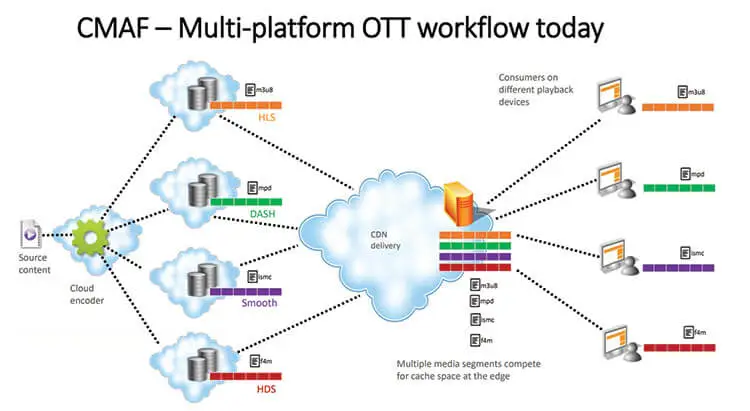
As a result, broadcasters who want to support both protocols often need to encode and store multiple versions of the same video. Encryption and packaging for each format produce separate sets of files, which are not interchangeable.
These multiple renditions must either be pre-encoded and stored in advance or generated on the fly, both of which increase storage and processing costs.
Apple and Microsoft suggested that Moving Pictures Expert Group create a new uniform standard called Common Media Application Format (CMAF) to reduce complexity when transmitting video online.
Time Line:
- February 2016: Apple and Microsoft proposed CMAF to the Moving Pictures Expert Group (MPEG).
- June 2016: Apple announced support of the
fMP4format. - July 2017: Specifications finalized.
- January 2018: CMAF standard officially published.
Why Do You Need CMAF?
Live video streaming involves many technical processes, from encoding to delivery, and relies on a variety of codecs, media formats, and protocols. This complexity increases when broadcasters must compress and package the same content in multiple container formats to support different streaming protocols like HLS and MPEG-DASH.
As mentioned earlier, to reach the widest possible audience, broadcasters often need to create and store multiple versions of the same video in different file containers—typically fragmented MP4 for MPEG-DASH and MPEG-TS for HLS. This duplication leads to increased costs in packaging, storage, and delivery.
Akamai highlighted this issue well:
“These same files, although representing the same content, cost twice as much to package, twice as much to store on origin, and compete with each other on Akamai edge caches for space, thereby reducing the efficiency with which they can be delivered.”
This is where CMAF (Common Media Application Format) becomes valuable. CMAF is a standardized media container format based on fragmented MP4, designed to work seamlessly across both HLS and MPEG-DASH. It enables a single-approach workflow for encoding, packaging, and storage—simplifying the streaming process while significantly reducing operational costs.
With CMAF, you only need to create one set of audio and video segments, paired with lightweight manifest files to support adaptive bitrate streaming across all major platforms. In theory, this can reduce encoding and storage costs by up to 75% and improve CDN cache efficiency by eliminating duplicate content.
How Does CMAF Work?
Before CMAF, Apple’s HLS protocol used the MPEG transport stream container format or .ts (MPEG-TS). Other HTTP-based protocols, such as DASH, used the fragmented MP4 format or .mp4 (fMP4). Microsoft and Apple have agreed to reach a wider audience through the HLS and DASH protocols using standardized transport containers in the form of fragmented MP4.
The purpose is to distribute content using the CMAF format, which is based on fragmented MP4 (fMP4). CMAF enables low-latency streaming by allowing the video to be broken into small chunks that can be transmitted as soon as they are encoded. These chunks can be delivered over HTTP using techniques like chunked transfer encoding, allowing playback to begin almost immediately. This approach supports near-real-time delivery (typically 3–5 seconds of latency) while later parts of the video are still being processed.
Advantages of CMAF Streaming
CMAF streaming technology is one of the easiest ways to reduce streaming latency and the complexity of streaming. CMAF streaming helps us with;
- Cutting costs
- Minimizing workflow complexity
- Reducing latency
CMAF and Other Streaming Protocols
Now, let’s compare different live streaming protocols with CMAF.
CMAF vs RTMP
RTMP streaming protocol, Transmission Control Protocol-based technology, was developed by Macromedia for streaming audio, video, and data over the Internet, between a Flash player and a server. Macromedia was purchased by its rival, Adobe Inc., on December 3, 2005. RTMP stands for Real-Time Messaging Protocol, and it was once the most popular live streaming protocol.
RTMP Streaming Protocol Technical Specifications
- Audio Codecs: AAC, AAC-LC, HE-AAC+ v1 & v2, MP3, Speex
- Video Codecs: H.264, VP8, VP6, Sorenson Spark®, Screen Video v1 & v2
- Playback Compatibility: Not widely supported anymore
- Limited to Flash Player, Adobe AIR, RTMP-compatible players
- No longer accepted by iOS, Android, most browsers, and most embeddable players
- Benefits: Low latency and minimal buffering
- Drawbacks: Not optimized for quality of experience or scalability
- Latency: 5 seconds
- Variant Formats: RTMPT (tunneled through HTTP), RTMPE (encrypted), RTMPTE (tunneled and encrypted), RTMPS (encrypted over SSL), RTMFP (layered over UDP instead of TCP)
CMAF vs HLS
HLS stands for HTTP Live Streaming. HLS is an adaptive HTTP-based protocol used for transporting video and audio data from media servers to the end user’s device.
HLS was created by Apple in 2009. Apple announced the HLS at about the same time as the legendary device iPhone 3. Earlier generations of iPhone 3 had live streaming playback problems, and Apple wanted to fix this problem with HLS.
The biggest advantage of HLS is its wide support area. HLS is currently the most used streaming protocol. However, the HLS protocol offers a latency of 5-20 seconds.
HLS’s adaptive-bitrate capabilities ensure that broadcasters deliver the optimal user experience and minimize buffering events by adapting the video quality to the viewer’s device and connection.
It may make more sense to use HLS in streams where video quality is important, but latency is not that important.
Features of the HLS video streaming protocol
- Closed captions
- Fast forward and rewind
- Alternate audio and video
- Fallback alternatives
- Timed metadata
- Ad insertion
- Content protection
HLS Technical Specifications
- Audio Codecs: AAC-LC, HE-AAC+ v1 & v2, xHE-AAC, Apple Lossless, FLAC
- Video Codecs: H.265, H.264
- Playback Compatibility: It was created for iOS devices. But now all Google Chrome browsers, Android, Linux, Microsoft, and macOS devices, several set-top boxes, smart TVs, and other players support HLS. It is now a universal protocol.
- Benefits: Supports adaptive bitrate, is reliable, and widely supported.
- Drawbacks: Video quality and viewer experience are prioritized over latency.
- Latency: HLS allows us to have 5-20 seconds of latency, but the Low-Latency HLS extension has now been incorporated as a feature set of HLS, promising to deliver sub-2-second latency.
CMAF vs WebRTC

In other words, low latency vs ultra-low latency. Ant Media Server right now supports both Low Latency (Common Media Application Format) and Ultra Low Latency (WebRTC). Here is some basic information about these technologies. CMAF provides low latency(3-5 secs) in live streaming; on the other hand, WebRTC provides Ultra-Low Latency(0.5 secs) in live streaming. Then, which one is good for your low-latency streaming project, CMAF streaming or WebRTC streaming? Let’s learn more about WebRTC.
WebRTC stands for Web Real-Time Communications. WebRTC is a very exciting, powerful, and highly disruptive cutting-edge technology and streaming protocol.
WebRTC is HTML5 compatible, and you can use it to add real-time media communications directly between browsers and devices. And you can do that without the need for any prerequisite plugins to be installed in the browser. Webrtc is progressively becoming supported by all major modern browser vendors, including Safari, Google Chrome, Firefox, Opera, and others.
Thanks to WebRTC video streaming technology, you can embed the real-time video directly into your browser-based solution to create an engaging and interactive streaming experience for your audience without worrying about the delay. WebRTC video streaming is just changing the way of engagement in the new normal.
WebRTC Features
- Ultra-Low Latency Video Streaming – Latency is 0.5 seconds
- Platform and device independence
- Advanced voice and video quality
- Secure voice and video
- Easy to scale
- Adaptive to network conditions
- WebRTC Data Channels
Which Streaming Protocol To Use?
Every technology has advantages and disadvantages. We talked enough about the Common Media Application Format, and you can learn more about WebRTC with this link. You can pick the right one according to your use case.
The Common Media Application Format is a strong choice when there is no need for real-time interactivity between broadcasters and viewers. It’s easier to scale using CDNs, and because it introduces a latency of about 3–5 seconds, it is less sensitive to network fluctuations such as jitter or temporary congestion.
HLS is also widely used for streaming, especially when latency is not a concern, and the focus is on compatibility and stream quality. It’s supported across a broad range of devices but typically incurs higher latency (6–30 seconds, depending on configuration).
On the other hand, WebRTC is ideal for scenarios requiring low-latency, real-time interaction, such as video conferencing, online tutoring, or live auctions. It delivers latency as low as 0.2 to 0.5 seconds, but this comes at the cost of more complex infrastructure. You need to manage and scale WebRTC edge servers, and performance can be more susceptible to network instability due to the real-time nature of the protocol.
CMAF in a Nutshell
The Common Media Application Format is an emerging standard designed to optimize video streaming by reducing latency, cost, and operational complexity. It streamlines server efficiency by enabling a single media format compatible with most endpoints. With CMAF, broadcasters can achieve low-latency streaming—typically around 3 to 5 seconds—while improving scalability and delivery efficiency.
Key Advantages:
- Lower Costs – One set of media files for multiple protocols reduces storage and encoding expenses.
- Simplified Workflow – A unified format eliminates the need for duplicate encoding and packaging.
- Reduced Latency – Supports near real-time streaming with sub-5-second latency.
This is where Ant Media comes in. Ant Media Server supports video distribution in various formats, including CMAF, WebRTC, LL-HLS, HLS, RTMP(ingest), SRT, and RTSP. You can scale your business with Ant Media Server.
Frequently Asked Questions
How does CMAF reduce streaming latency?
CMAF enables chunked video delivery and optimized packaging, which can reduce live streaming latency to around 3–5 seconds, significantly faster than traditional HLS setups that may reach 10–12 seconds.
Is CMAF compatible with most devices and browsers?
Yes. CMAF streams can be played on major browsers such as Chrome, Firefox, Safari, and Edge, making it a widely compatible format for scalable video delivery.
When should I use CMAF instead of WebRTC?
CMAF is ideal for large-scale broadcasts where a few seconds of latency is acceptable, while WebRTC is better suited for ultra-low-latency interactive scenarios like video calls or live collaboration.
Useful Resources
Explore more about streaming technologies, developer tools, and industry trends:
📘Documentation & Developer Guides
- Ant Media Server Full Documentation
- Developer Community Forum
- WebRTC SDK Guides for Android, iOS, React Native, and Flutter
🌐 Industry Insights & Blog Posts
- The Future of Ultra-Low Latency Streaming Market
- CMAF with HLS – Apple Developer Documentation
- WebRTC Overview – WebRTC.org
Estimate Your Streaming Costs
Use our free Cost Calculator to find out how much you can save with Ant Media Server based on your usage.
Open Cost Calculator